
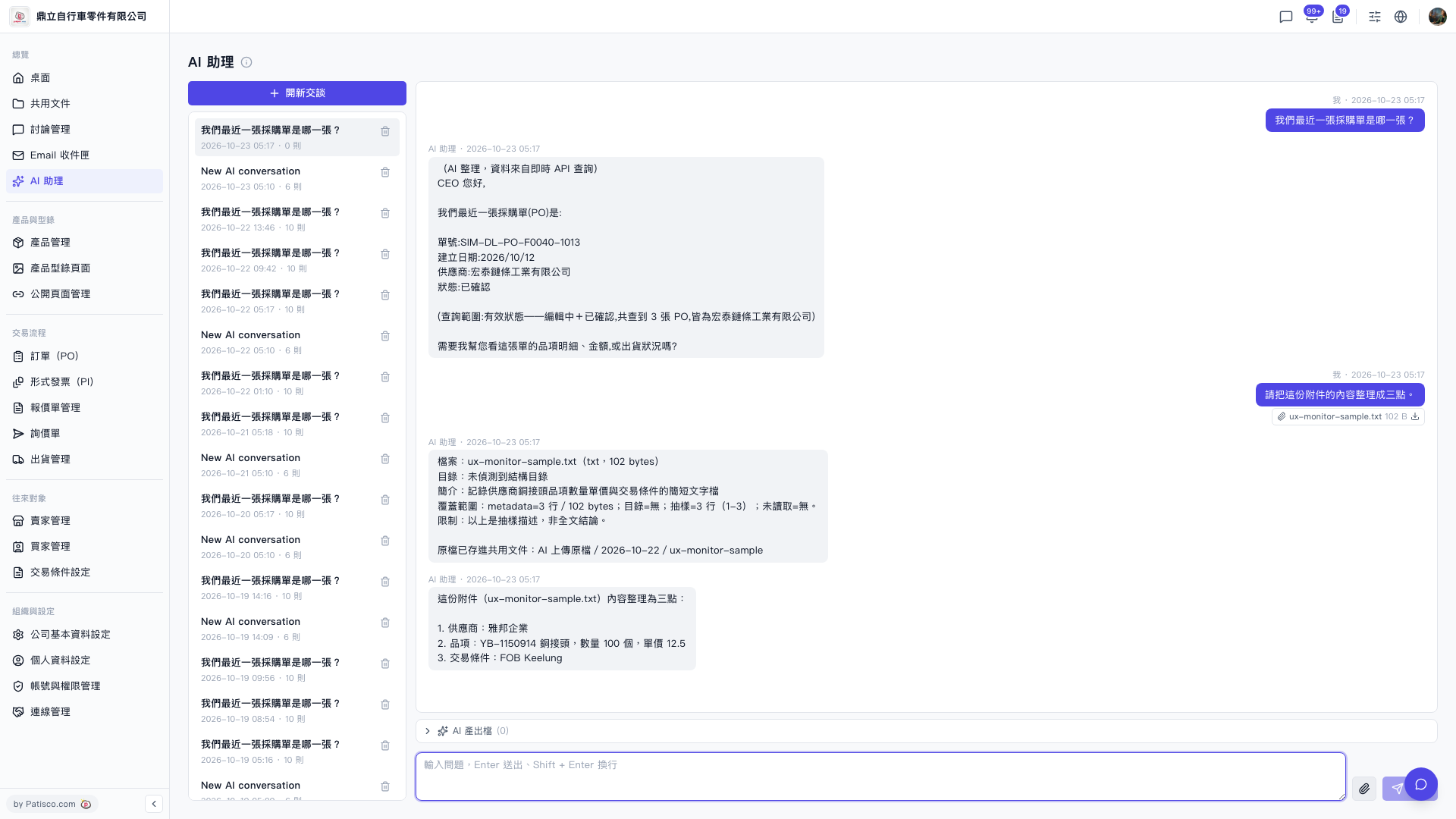
1. Click "AI assistant" in the left sidebar to open the page. 2. Click "New chat" above the conversation list on the left to create a new conversation, or select an existing conversation from the left list to continue. 3. Click the "paperclip icon (attachment)" on the right side of the input box and select the file to upload. 4. Type your instructions in the text box at the bottom of the page. Enter sends; Shift + Enter inserts a line break. 5. Press Enter or click the "send (paper plane icon)" at the far right of the input box, then wait for the AI's reply. 6. Read the AI's reply in the conversation area. A download icon appears next to the uploaded attachment so you can download it again.
You can ask: "Please summarize the content of this attachment in three points." How the AI replies: It first describes the file (for example, ux-monitor-sample.txt, 102 bytes, a short text file containing the supplier's copper fitting item, quantity, unit price, and trading conditions), then lists three points: the supplier is 雅邦企業; the item is YB-1150914 copper fitting, quantity 100 pcs, unit price 12.5; the trading condition is FOB Keelung.
Tip: The AI's reply states its coverage, for example "The above is a sampled description, not a conclusion based on the full text." Keep this in mind for larger files.
 V5 新桌面版|AI 助理