
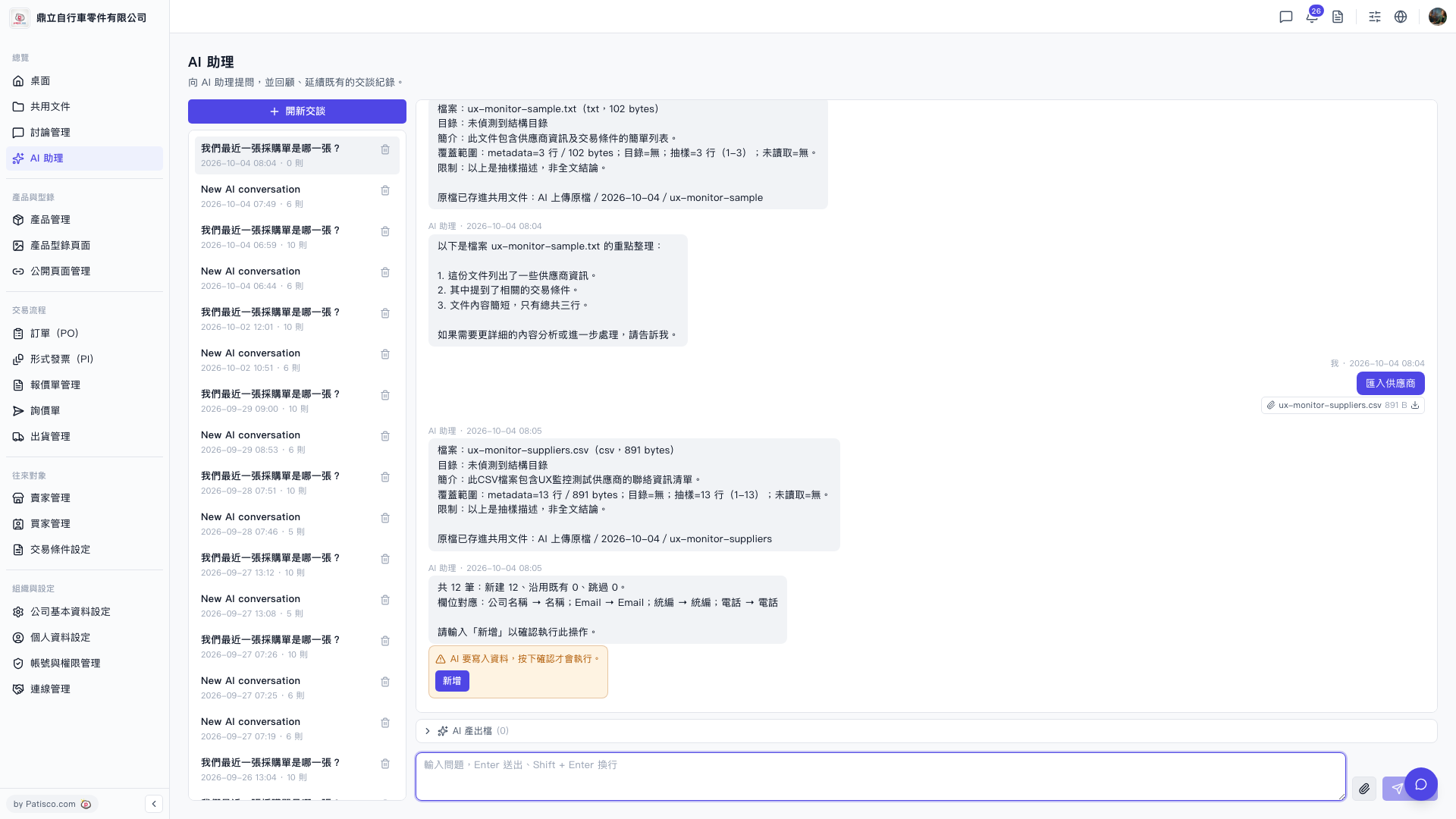
1. Open the AI assistant page (you will see /ai-assist in the URL bar). 2. Upload the prepared CSV file directly to the AI assistant, or type "Import supplier" and attach the file. 3. The AI assistant will automatically analyze the file content and display the field mapping results, such as: "Company Name → Name; Email → Email; Tax ID → Tax ID; Phone → Phone," as well as the estimated number of new records to be created. 4. After confirming that the field mapping and number of records are correct, enter "Add" in the chat box, and the AI assistant will write the data into the system.
You can ask like this: "Please import this supplier list CSV." The AI will respond like this: "Total 12 records: 12 new to create, 0 existing to reuse, 0 to skip. Field mapping: Company Name → Name; Email → Email……Please enter 'Add' to confirm this operation."
Known situation: The AI assistant currently will not automatically notify you of output files or download links after import completion. If you need an import result record, please check the original file in the "AI uploaded files / 2026-10-04 /" shared document folder.
 V5 新桌面版|ai.outputs.csv