
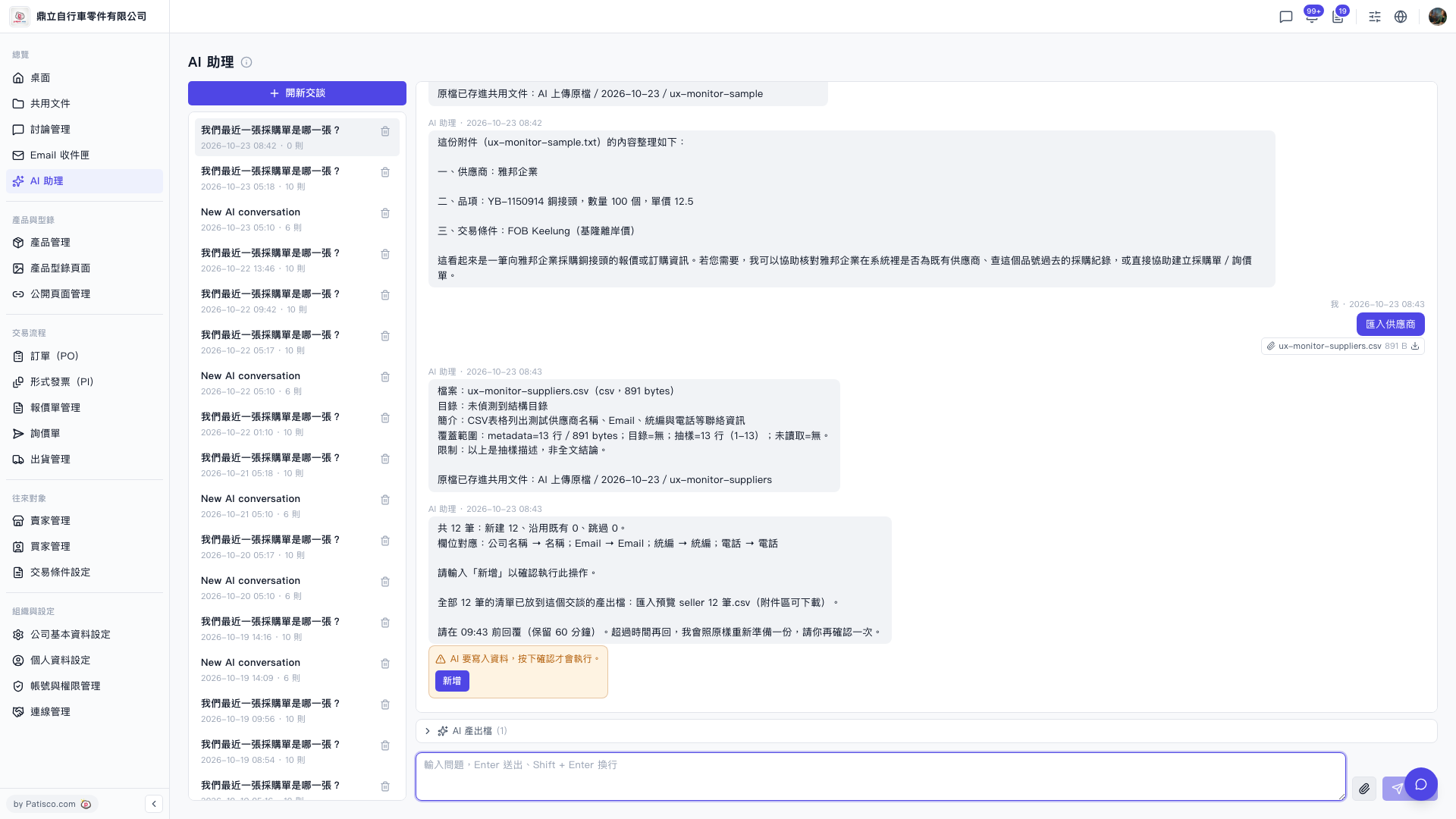
1. Click "AI assistant" in the left sidebar. 2. Click "New chat" above the conversation list on the left, or select an existing conversation from the list. 3. Click the attachment (paperclip) icon on the right side of the input box and upload the supplier CSV file. It must contain company name, Email, tax ID number, and phone number. 4. Type "Import suppliers" in the input box and press Enter to send (Shift+Enter starts a new line). 5. Wait for the AI to reply with a file summary and field mapping, and check that the counts (new / reuse existing / skipped) are correct. 6. Once everything looks right, click "Add" in the orange notice box at the bottom of the conversation area, or type "Add" in the input box and send it. Only then is the data actually written to the system.
You can ask: "Import suppliers" (with a 12-row CSV attached). The AI will reply like this: "12 records in total: 12 new, 0 reused existing, 0 skipped. Field mapping: Company name → Name; Email → Email; Tax ID → Tax ID; Phone → Phone. Please type 'Add' to confirm this operation."
 V5 新桌面版|AI 助理