
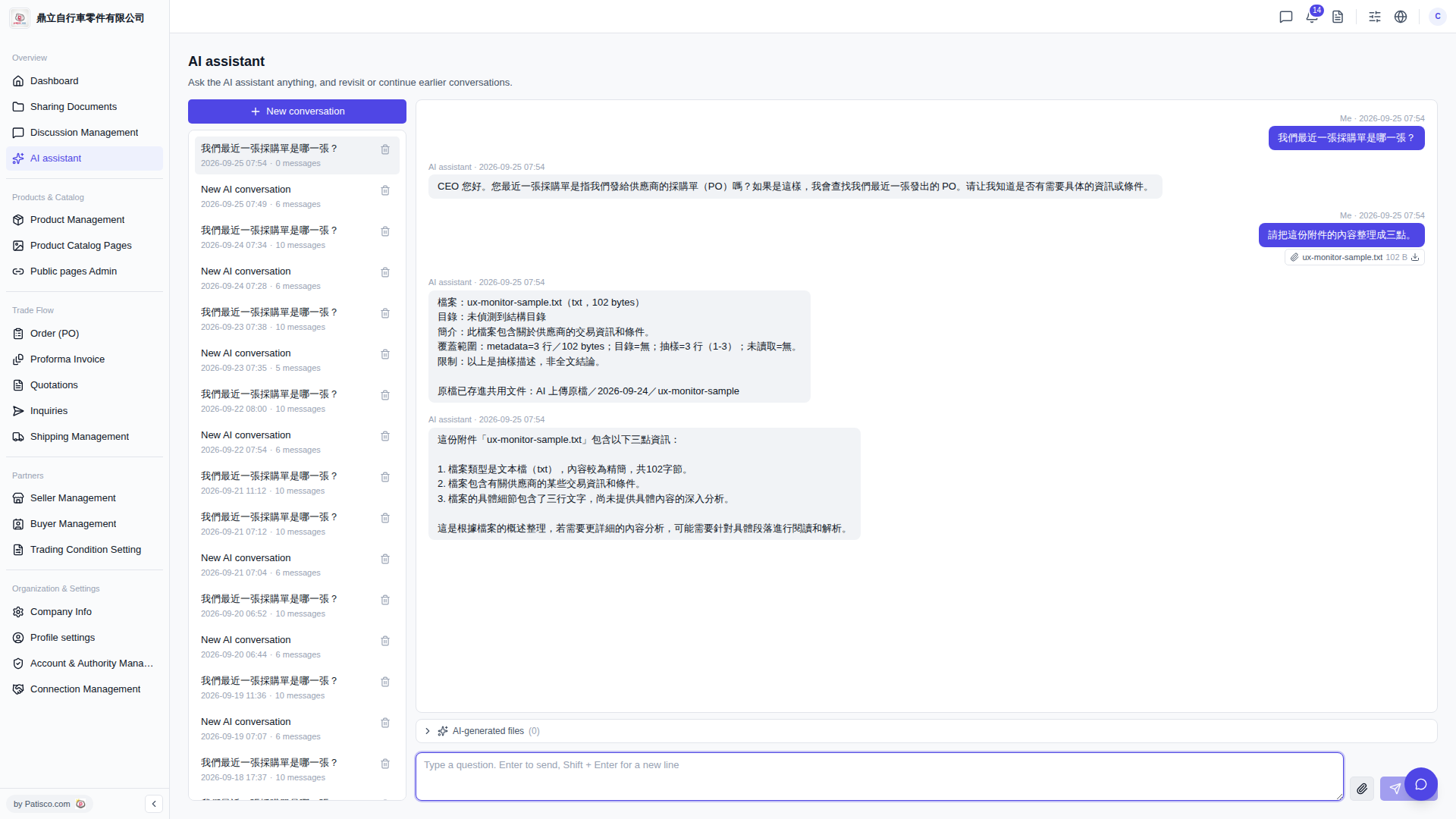
1. Click "AI assistant" in the left sidebar to enter the AI assistant page. 2. Next to the message input box at the bottom right, click the "Attachment icon (paperclip)" to select the file you want to upload. 3. After the file is uploaded, type your question in the input box and press Enter to submit. 4. The AI assistant will reply with analysis results in the conversation area, and attachment information (filename, size) will also be displayed in the conversation. 5. If the AI generates additional files, click "AI-generated files (0)" at the bottom of the conversation area to expand and download them.
You can ask like this: "Please summarize the content of this attachment into three points." The AI might respond: "This attachment 'ux-monitor-sample.txt' contains the following three pieces of information: 1. The file type is a text file (txt) with relatively concise content, totaling 102 bytes. 2. The file contains certain transaction information and conditions regarding suppliers. 3. The specific details of the file include three lines of text, but I haven't provided an in-depth analysis of the specific content yet."
 V5 新桌面版|AI assistant