
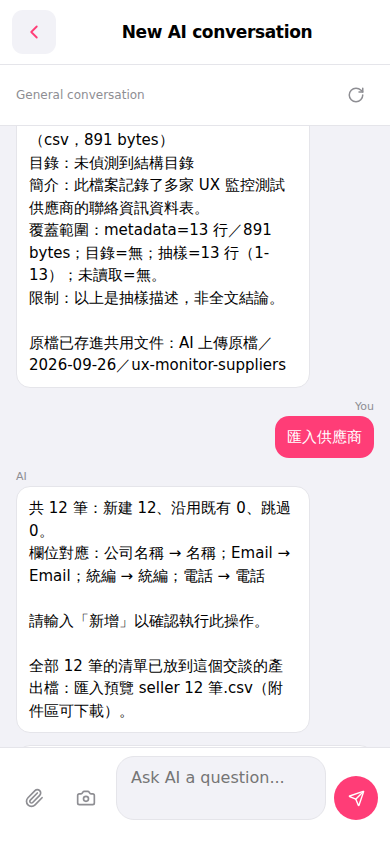
1. Open the AI conversation page (New AI conversation). 2. Click the "attachment (paperclip)" button in the bottom left and upload your supplier CSV file. 3. Type "Import suppliers" in the message input box and click the pink "send (➤)" button on the bottom right; or directly click the pink "Import suppliers" quick action button in the conversation bubble. 4. The AI will automatically analyze the CSV and display the field mapping (for example: Company Name → Name, Email → Email, Registration ID → Registration ID, Phone → Phone) and import statistics (new records created/reused existing/skipped). 5. After confirming the field mapping is correct, type "Add" in the input box and click "send (➤)" to confirm and execute the import. 6. After completion, the AI will generate an import preview CSV file in the attachment area (for example: Import preview seller 12 records.csv). Click the filename to download it.
 手機版|New AI conversation