
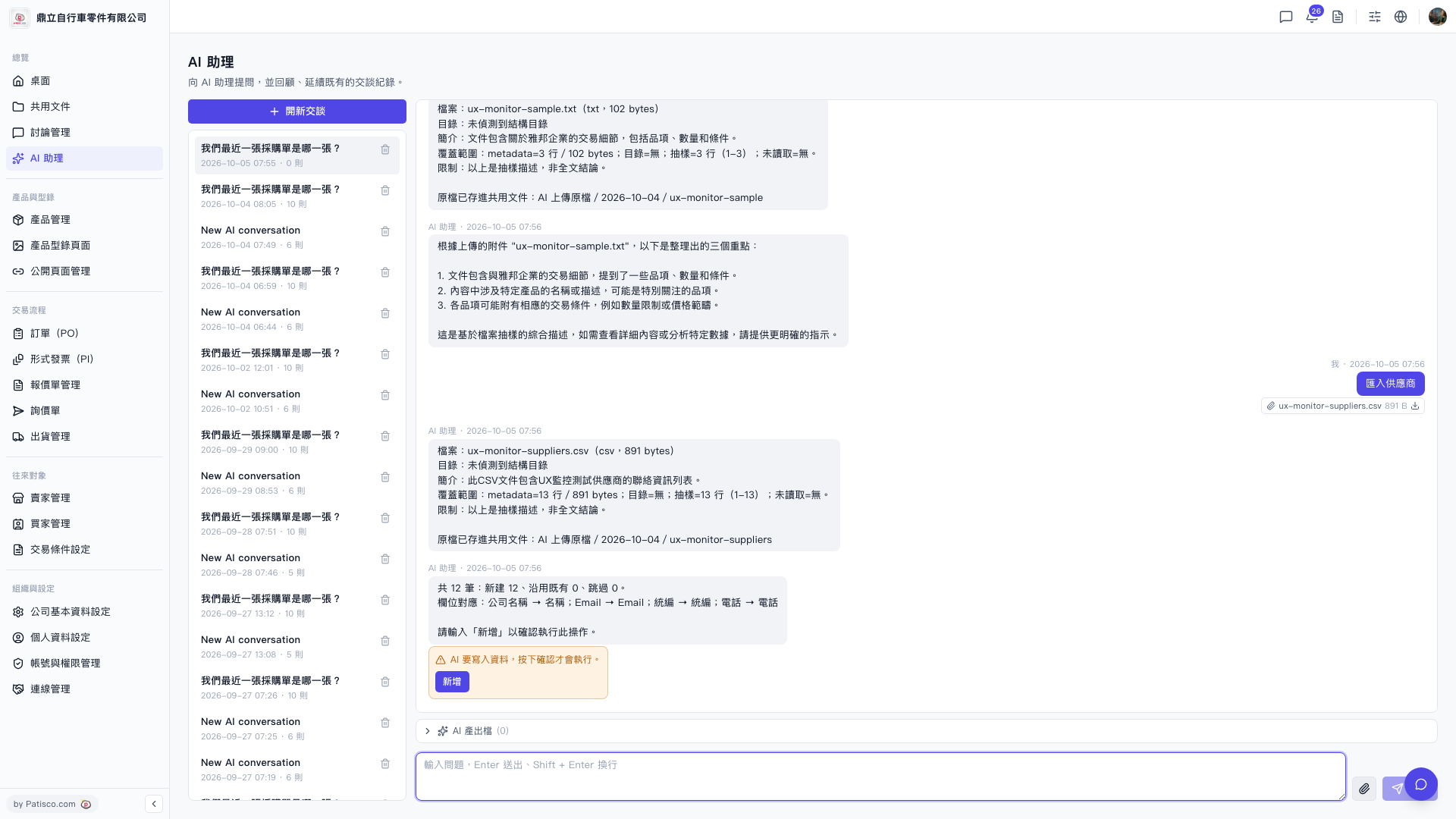
1. Go to the "AI assistant" page from the left menu. 2. To start a new conversation, click "+ New chat" in the top left. 3. Click the attachment upload icon at the bottom right of the input field and select the CSV file you want to import. 4. Press Enter to submit. The AI will automatically parse the file and provide a summary, including the number of records and field mappings (for example: Company Name → Name; Email → Email; Tax ID → Tax ID; Phone → Phone). 5. After confirming the data is correct, click the "Import Suppliers" button in the conversation. 6. The AI will display the number of records to be written. After confirmation, click the "Add" button in the orange section to execute the import.
You can ask like this: "Import suppliers (12 rows csv)" The AI will respond like: "Total 12 records: 12 new, 0 existing, 0 skipped. Field mappings: Company Name → Name; Email → Email; Tax ID → Tax ID; Phone → Phone. Enter 'Add' to confirm this operation."
Known issue: In this import process, the "AI Output Files (0)" section does not display any output files. If you expect this operation to generate output, please confirm before proceeding.
 V5 新桌面版|AI 助理