
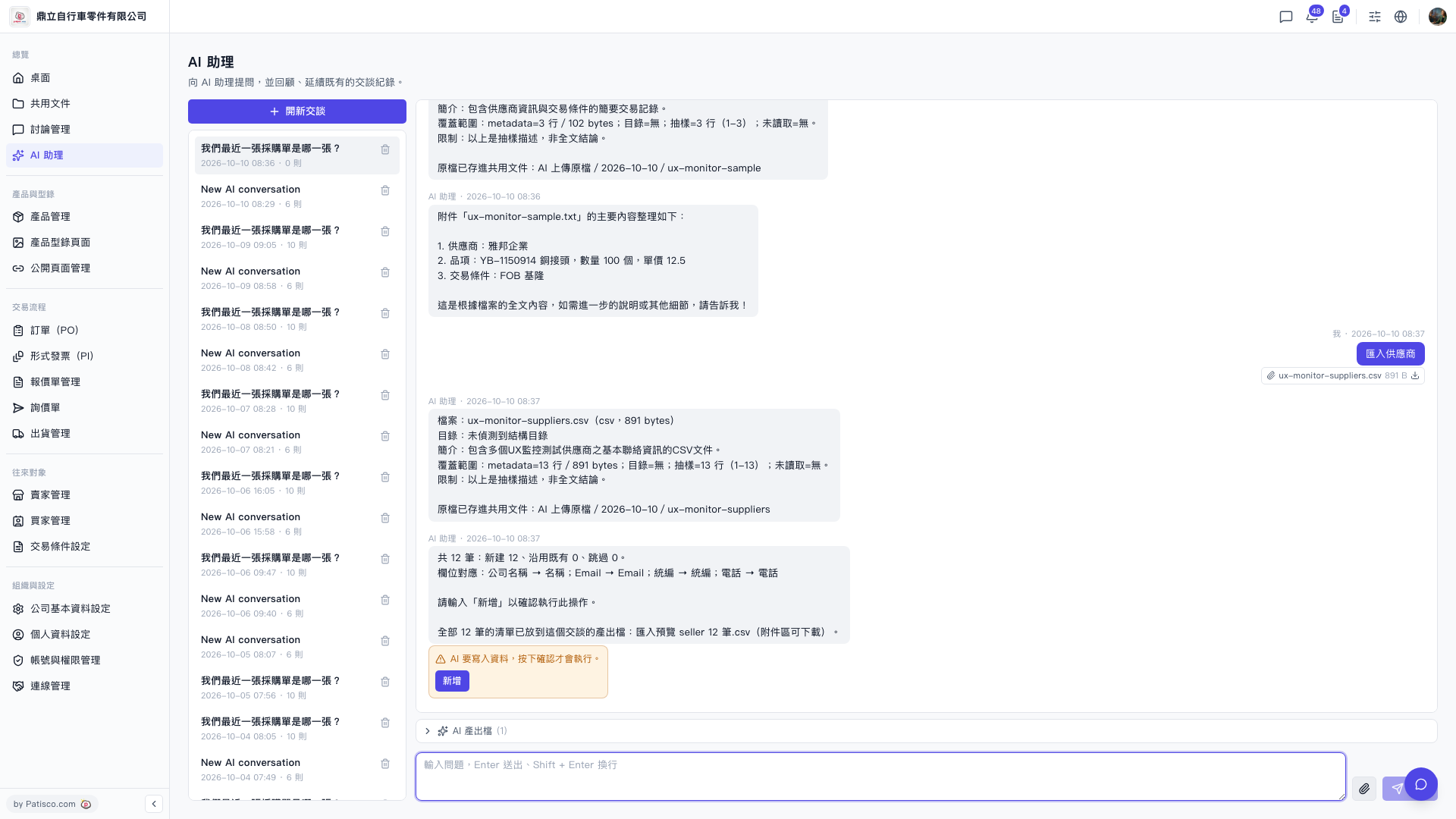
1. Open the AI assistant page (URL shows /ai-assist). 2. Upload the prepared supplier CSV file to the AI assistant (the file must include fields such as company name, email, registration number, phone number, etc.). 3. The AI assistant will automatically analyze the file and display the field mapping results, for example "Company Name → Name; Email → Email; Registration Number → Registration Number; Phone → Phone", and the number of new records to be created. 4. After confirming that the information is correct, enter "Add" to submit, and the AI assistant will actually write the data. 5. After the import is complete, you can download "Import Preview seller N.csv" from the attachment area of the conversation to confirm the results.
You can ask like this: "Import suppliers" (with CSV file attached) The AI will respond like this: "Total 12 records: 12 new created, 0 existing used, 0 skipped. Field mapping: Company Name → Name; Email → Email; Registration Number → Registration Number; Phone → Phone. Please enter 'Add' to confirm this operation."
 V5 新桌面版|ai.outputs.csv