
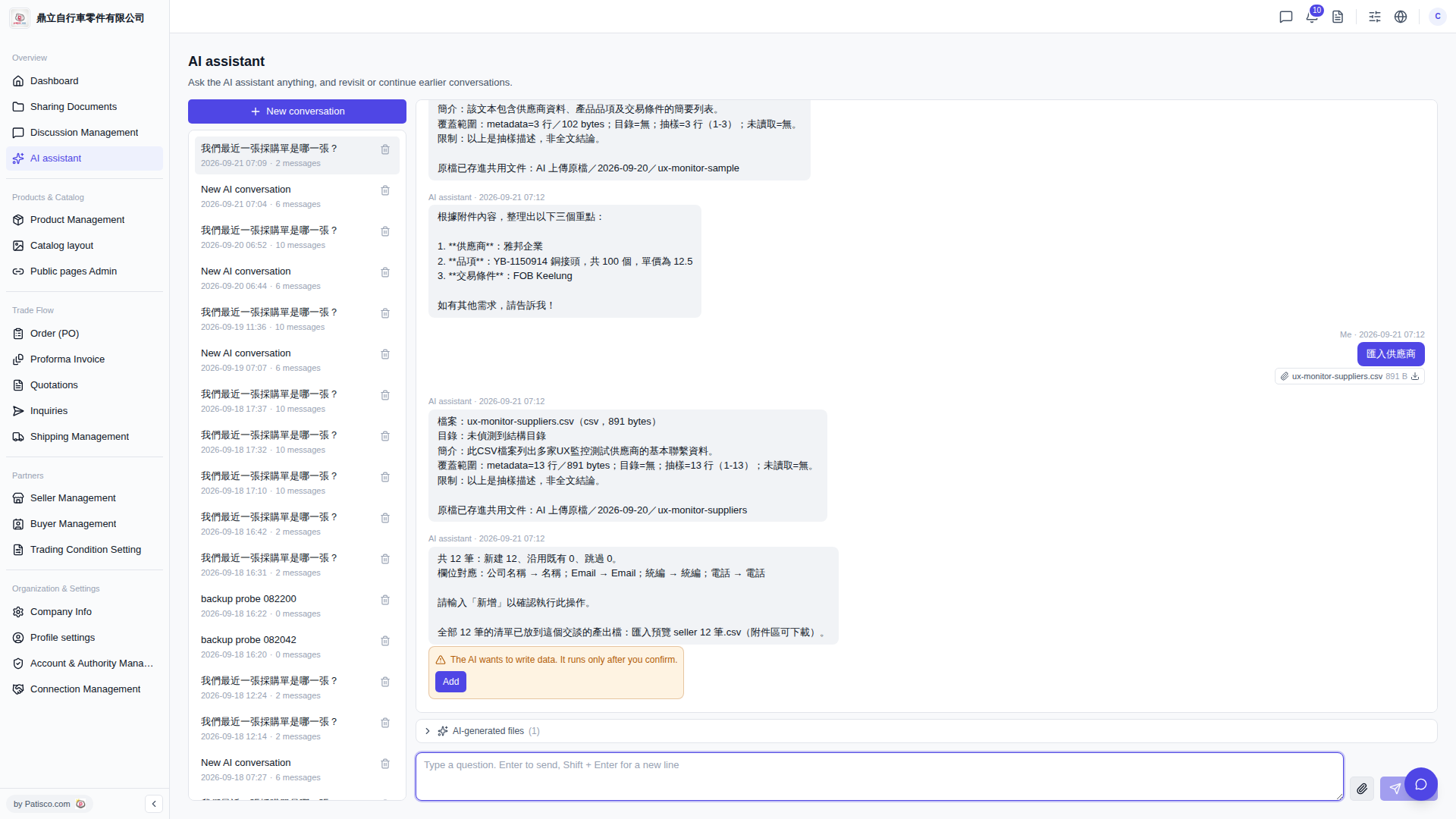
1. Click "+ New conversation" at the top of the conversation list on the left sidebar to open a new conversation. 2. Click the 📎 icon on the right side of the input box and select a local supplier CSV file to upload. 3. Type a command in the input box (e.g., "Import suppliers"), then press Enter or click the send button (paper plane icon) to submit. 4. The AI will reply with a file summary and field mapping preview (e.g., "Company Name → Name; Email → Email; Tax ID → Tax ID; Phone → Phone"). Confirm the content is correct. 5. When an orange warning box appears saying "The AI wants to write data. It runs only after you confirm.", click the "Add" button to execute the import. 6. After the import is complete, "AI-generated files (1)" will appear at the bottom of the conversation. Click to expand and download the CSV preview file generated by the AI.
Example question: "Import suppliers" Example AI response: "Total 12 records: 12 new, 0 existing, 0 skipped. Field mapping: Company Name → Name; Email → Email; Tax ID → Tax ID; Phone → Phone. Please type 'confirm' to proceed with this operation."
 V5 新桌面版|AI assistant