
1. Go to the "New AI conversation" page. 2. Click the "attachment (paperclip icon)" on the left side of the input area at the bottom to upload the CSV file containing supplier data. 3. After the AI finishes analyzing, enter "Import suppliers" in the input box and click the "send (pink arrow button)" on the right. 4. Confirm that the field mappings shown in the AI response (Company Name → Name, Email → Email, Tax ID → Tax ID, Phone → Phone) and the number of records are correct. 5. Enter "Add" in the input box and click "send" to complete the batch import.
Example question: "Import suppliers (12 rows csv)" Example AI response: "AI import suppliers total 12 records: 12 new, 0 existing, 0 skipped. Field mappings: Company Name → Name; Email → Email; Tax ID → Tax ID; Phone → Phone. Please enter 'Add' to confirm this operation."
Known limitation: The source filename is currently not displayed in the AI response. When confirming fields and record count, please manually verify against the original CSV content.
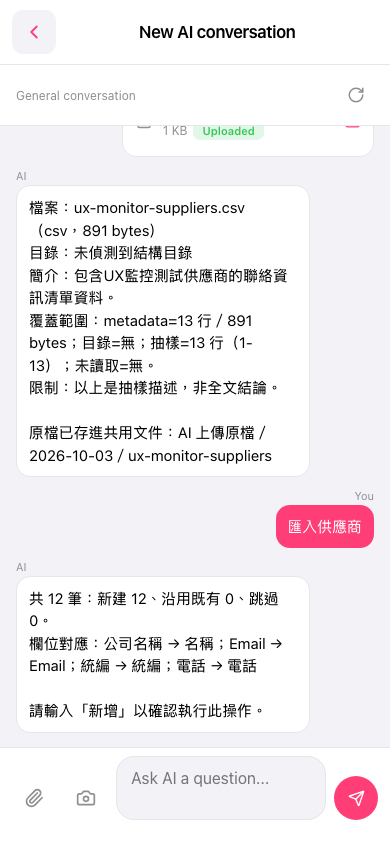 手機版|New AI conversation(AI 對話)