
1. Open the mobile version of Patisco and navigate to the "AI assistant (New AI conversation)" page. 2. Click the "attachment (paperclip icon)" on the left side of the input field at the bottom, select and upload the CSV file containing supplier data. 3. Type "Import suppliers" in the message input field and click the "send (pink arrow)" on the right. 4. The AI will analyze the CSV and report the field mapping results (Company Name → Name, Email → Email, Tax ID → Tax ID, Phone → Phone) and the count for each category (New, Existing, Skipped). 5. After confirming the information is correct, type "Add" in the input field and click "send (pink arrow)" to execute the import. 6. Wait for the AI to report the final import completion result.
Known issue: The AI response currently does not specifically mark the attached output file in the message. If you need to verify the original CSV, please keep a backup of the uploaded file.
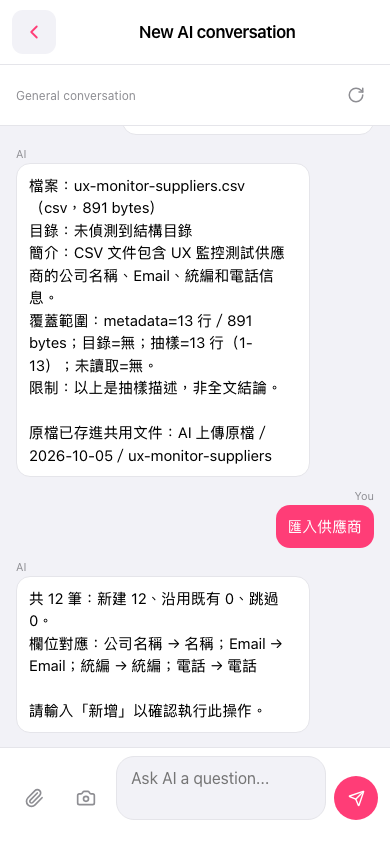 手機版|AI 對話(New AI conversation)