
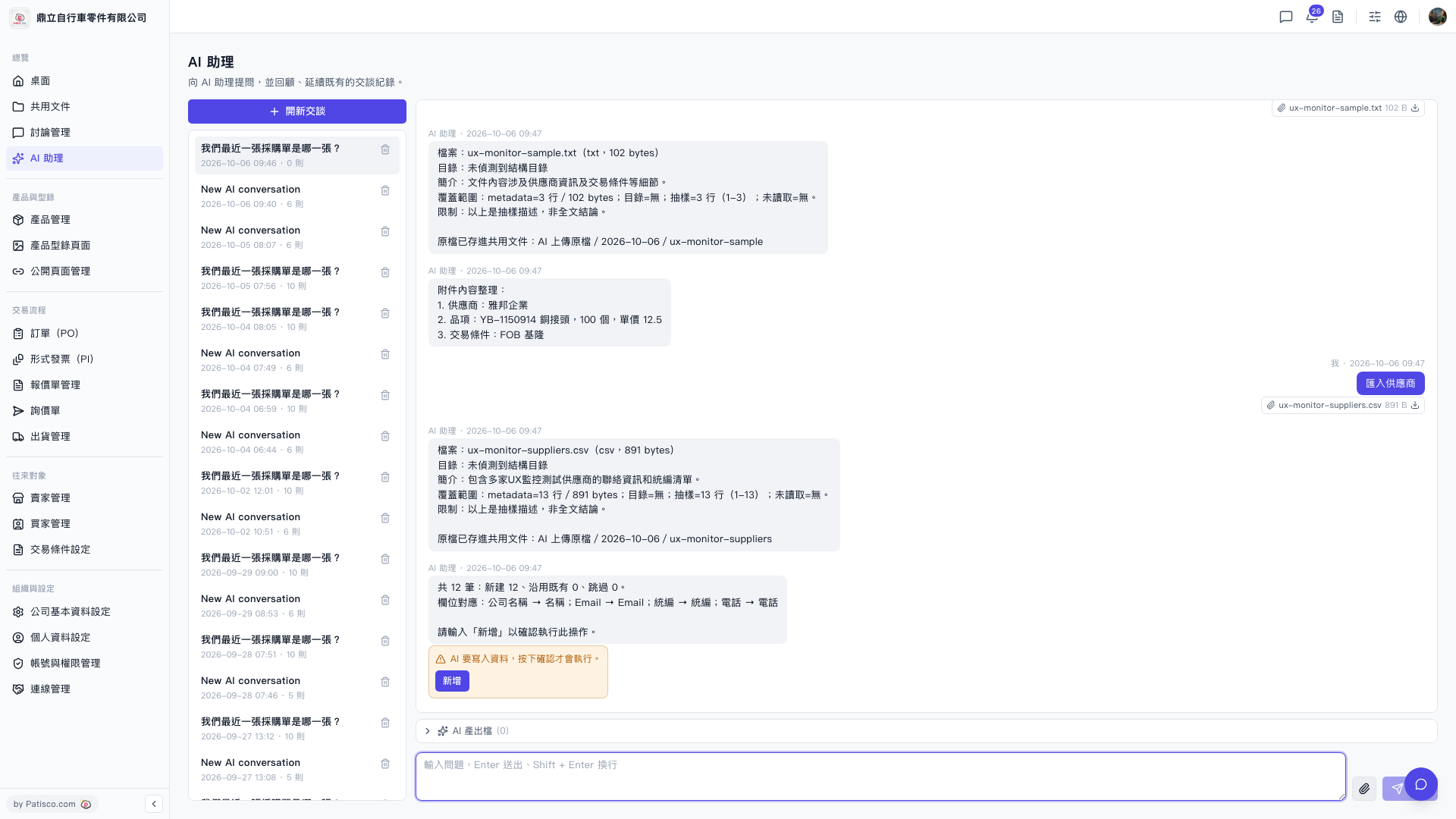
1. Open the AI assistant page (you will see /ai-assist in the address bar). 2. Upload your Seller Management CSV file directly, or type "import sellers" in the conversation box and attach the file. 3. The AI assistant will automatically parse the file and display the field mapping results, for example: Company Name → Name, Email → Email, Tax ID → Tax ID, Phone → Phone, and the number of records to be created. 4. After confirming the information is correct, type "add" in the conversation box for AI to actually write the data.
You can ask like this: "Import sellers" (and attach a CSV file). AI will respond like: "Total 12 records: 12 new, 0 existing, 0 skipped. Field mapping: Company Name → Name; Email → Email; Tax ID → Tax ID; Phone → Phone. Please type 'add' to confirm this operation."
Known status: The AI assistant's response does not clearly indicate the location of the output file after import. It only notes that the original file has been saved in the shared documents folder "AI uploaded files/2026-10-06/". Please visit that folder to verify.
 V5 新桌面版|ai.outputs.csv