
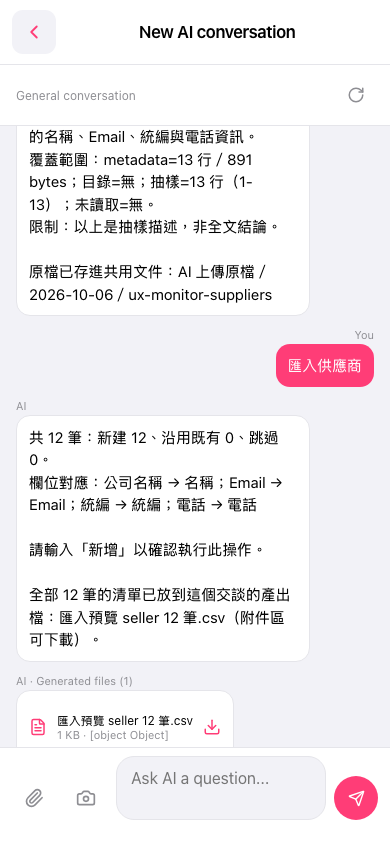
1. Go to the "New AI conversation" page. 2. Type "import suppliers" in the input field and tap the pink arrow button to submit. 3. The AI will respond with field mapping results and the number of records. For example: Company Name → Name, Email → Email, Tax ID → Tax ID, Phone → Phone. Confirm the number of records is correct (in this example, 12 new records will be created). 4. Download and review the "import preview seller 12 records.csv" from the attachment area at the bottom of the conversation. 5. After confirming everything is correct, type "create" in the input field and tap the pink arrow button to submit. Wait for the AI to confirm the import is complete.
📌 Example question: "import suppliers" Example AI response: "Importing suppliers AI with 12 records: 12 new, 0 existing, 0 skipped. Field mapping: Company Name → Name; Email → Email; Tax ID → Tax ID; Phone → Phone. Please type 'create' to confirm this operation."
⚠️ Known issue: The AI response mentions the output file "import preview seller 12 records.csv", but the "AI Output Files" card currently does not appear. Please download the file directly from the attachment area at the bottom of the conversation.
 手機版|New AI conversation