
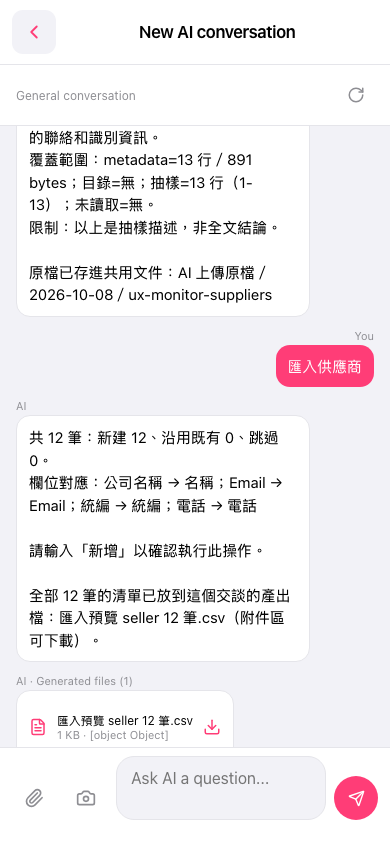
1. Open the 'AI conversation (New AI conversation)' page. 2. If you need to upload a CSV file, click the 'Attachment icon (paperclip)' at the bottom left to select the file. 3. Type 'Import suppliers' in the bottom input field, then click the 'Send button (pink circular arrow)' at the bottom right to submit. 4. The AI will reply with an import summary, confirming whether field mapping is correct (Company Name → Name, Email → Email, Tax ID → Tax ID, Phone → Phone) and the number of new records and skipped records. 5. After confirming everything is correct, type 'Add' in the input field and send it; the AI will then execute the import.
You can ask like this: 'Import suppliers (12 rows csv)' The AI will respond like this: 'Import suppliers AI: 12 records total: 12 new, 0 existing, 0 skipped. Field mapping: Company Name → Name; Email → Email; Tax ID → Tax ID; Phone → Phone. Please type 'Add' to confirm this operation.'
 手機版|AI 對話(New AI conversation)