
1. On the "AI conversation" page, type "Import sellers" in the input box and click the pink arrow button on the right to send. 2. The AI will reply with comparison results, such as how many records in total and whether each field mapping is correct (Company Name → Name, Email → Email, Tax ID → Tax ID, Phone → Phone). 3. After confirming the field mappings are correct, type "Add" and send; the AI will then execute the actual import. 4. Wait for the AI to send the completion notification.
For example, you can ask: "Import sellers" The AI might respond: "Seller import AI found 12 records total: 12 new, 0 existing, 0 skipped. Field mapping: Company Name → Name; Email → Email; Tax ID → Tax ID; Phone → Phone. Please type 'Add' to confirm this operation."
Known issue: The AI response mentions a generated file, but the "AI output file" card may not display properly. Please look for the file in the attachments section at the bottom of the conversation instead.
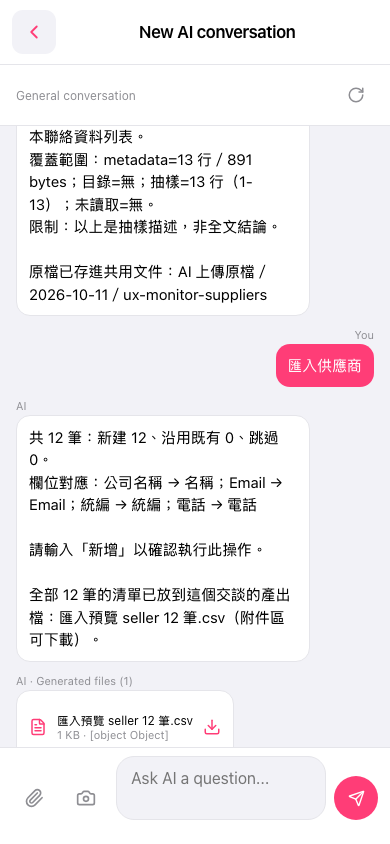 手機版|AI 對話(New AI conversation)