
1. Click "Quotations" in the "Trade Flow" section of the left sidebar to enter the "Quotations (Quotation Management)" page. 2. Once inside, use the "Sent" or "Received" tabs in the filter area on the left to switch between viewing sent or received quotations. 3. To search for a specific quotation, select a condition in the search bar (e.g., Quotation number) and enter a keyword, then press Enter. 4. To add a new quotation, click "+ Add quotation" in the top right and fill in buyer, currency, validity period and other information. 5. To view the details of a quotation, click the quotation number in the list (e.g., QT-2026-0411). 6. To export quotation data, click "Download Excel" in the top right to download an Excel file. 7. To adjust displayed columns, click "Columns 6/10" in the top right to select which fields to show or hide. To adjust how many quotations display per page, click "Preferences" in the bottom right.
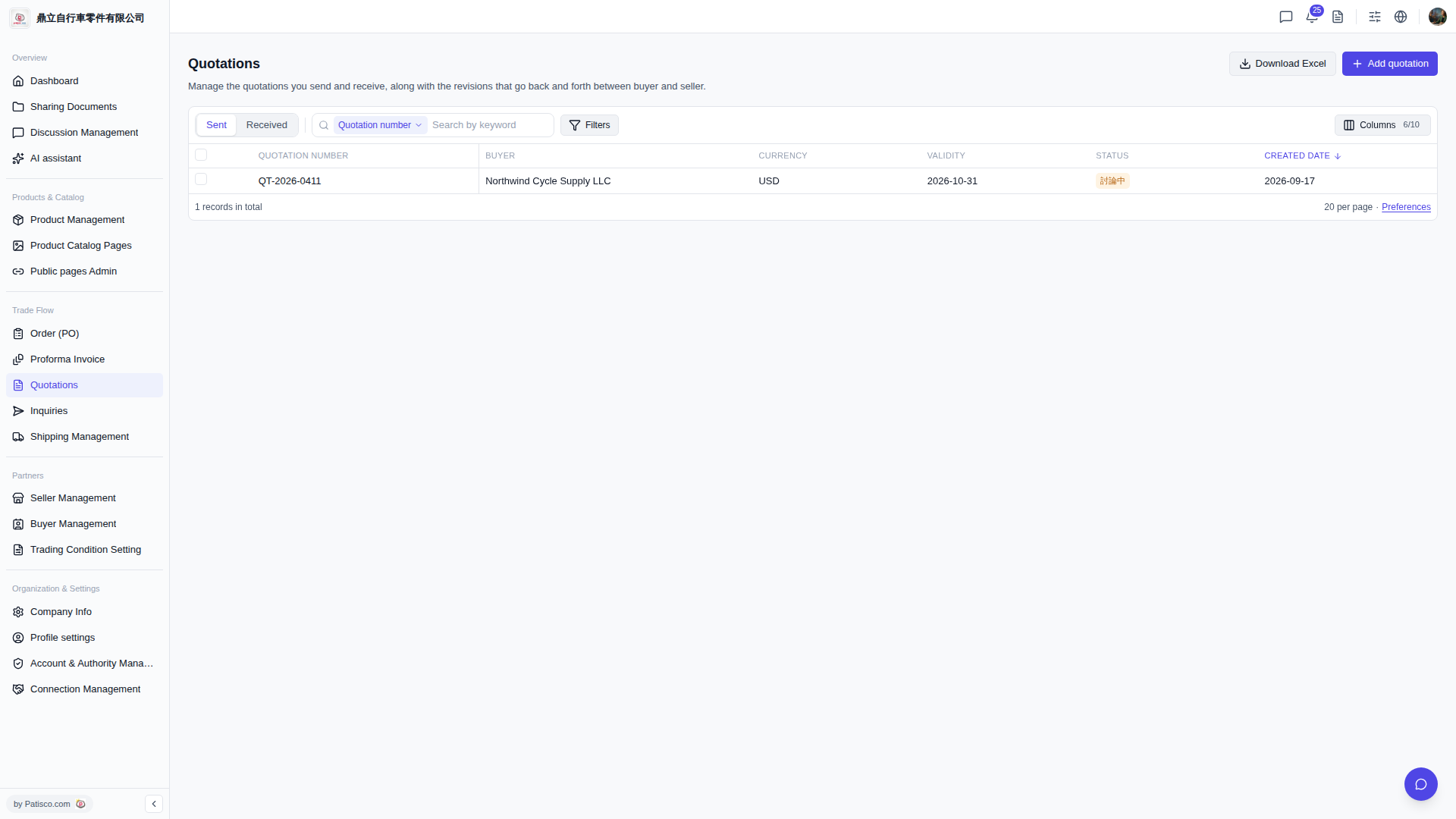 V5 新桌面版|Quotations(報價單管理)