Your challenges
AI is here. How do we keep up?
AI helps only when it can read your data
Buyers compare online and move on. How do we catch them?
From first curiosity to first contact, without a break
Short-handed. How can the team work more easily?
No chasing messages, one continuous flow
Moments in Trade
Chinese only for now
Digital native
How it works
What they see: catalogs and documents
Each customer’s own catalog and prices; quotes and PIs are digital from the start
Exchanges: email and LINE
Exchanges become company data as they arrive, filed under the right customer and document
What AI does
Transcribe, compare, draft, all behind buttons; a person presses send
Through to shipping and payment
Agree, convert to PI, ship, collect, with a record at every step
Data and security
A person presses send; only business exchanges; never used for training
Resources
See how others do it
Customer Cases
Real cases and application scenarios
Find answers
FAQ
Product and trade questions, updated nightly
Getting started
Invited?
Invited by a customer or supplier? Three steps
Integrations & API
Excel / PDF, API, MCP (coming)
Free reference tools
EU compliance toolbox
Reference: check EU rules by HS code
PPWR packaging declaration
Make your EU packaging declaration in 5 minutes
All resources →
About
🇺🇸 EN
▾
🇹🇼
中文
✓
🇺🇸
EN
✓
🇯🇵
日本語
✓
Talk to us for 20 min
→
Your challenges
AI is here. How do we keep up?
AI helps only when it can read your data
Buyers compare online and move on. How do we catch them?
From first curiosity to first contact, without a break
Short-handed. How can the team work more easily?
No chasing messages, one continuous flow
Moments in Trade
Chinese only for now
Digital native
How it works
What they see: catalogs and documents
Each customer’s own catalog and prices; quotes and PIs are digital from the start
Exchanges: email and LINE
Exchanges become company data as they arrive, filed under the right customer and document
What AI does
Transcribe, compare, draft, all behind buttons; a person presses send
Through to shipping and payment
Agree, convert to PI, ship, collect, with a record at every step
Data and security
A person presses send; only business exchanges; never used for training
Resources · See how others do it
Customer Cases
Real cases and application scenarios
Resources · Find answers
FAQ
Product and trade questions, updated nightly
Resources · Getting started
Invited?
Invited by a customer or supplier? Three steps
Integrations & API
Excel / PDF, API, MCP (coming)
Resources · Free reference tools
EU compliance toolbox
Reference: check EU rules by HS code
PPWR packaging declaration
Make your EU packaging declaration in 5 minutes
About
Language
🇹🇼 中文
🇺🇸 EN
🇯🇵 日本語
Talk to us for 20 min
→
FAQ
›
Using the system
V5 新桌面版怎麼查看最近更新的訂單或全部訂單?
1. 在桌面的「最近更新的訂單」區塊,點選訂單編號查看對應訂單。 2. 若要查看其他訂單,點選區塊左下方的「全部訂單」,進入訂單列表。
V5 新桌面版|桌面-數據分析
V5 desktop
← All questions
Talk to us for 20 min
→
💬
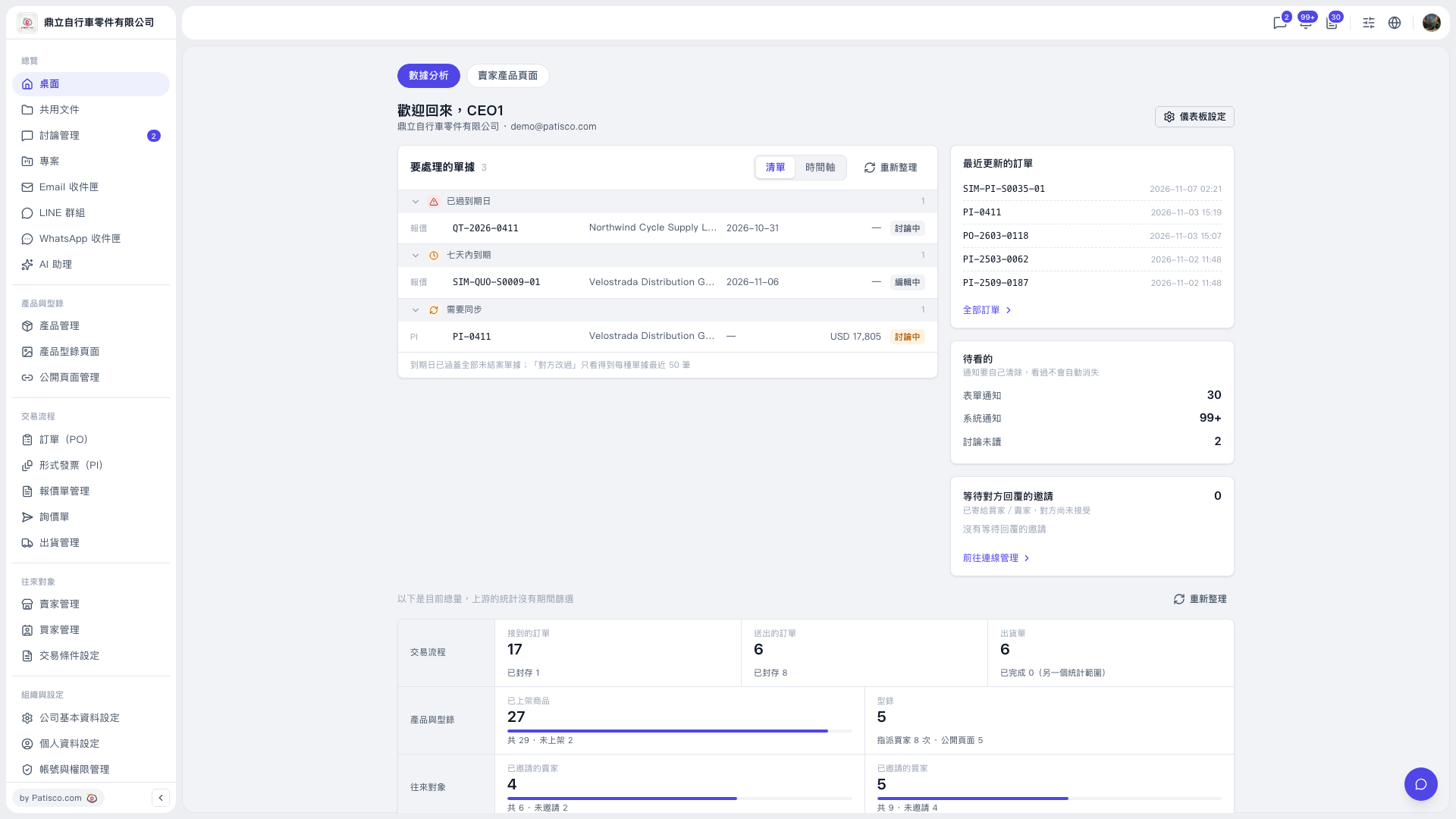 V5 新桌面版|桌面-數據分析
 V5 新桌面版|桌面-數據分析