
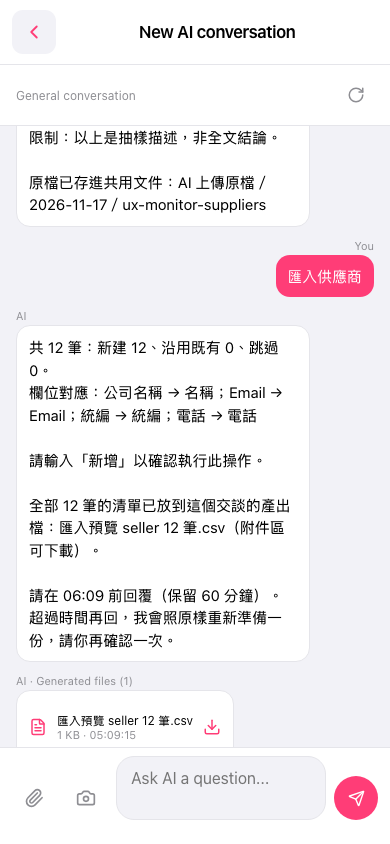
1. First, review the import counts and field mappings listed by the AI. This time, there are 12 records in total: 12 new, 0 using existing records, and 0 skipped. The field mappings are “Company Name → Name,” “Email → Email,” “Tax ID → Tax ID,” and “Phone → Phone.” 2. In the “Generated files” attachment area below the conversation, tap the download icon next to “匯入預覽 seller 12 筆.csv” to download and check the data. 3. After confirming that the data is correct, enter “新增” in the “Ask AI a question...” message input field, then tap “Send” at the bottom right to confirm and run the import. 4. Follow the prompt on this screen and reply before 06:09. After the deadline, the AI will prepare the data again, and you will need to confirm it again. 5. You can ask: “Import suppliers (12-row CSV).” The AI will reply: “There are 12 records in total, with 12 new records. The preview list is in the attachment area. Please enter ‘新增’ to confirm and proceed.”
 手機版|New AI conversation