
1. In the Generated files attachment section of the AI conversation, tap the import preview CSV attachment or the download icon to download and check the list. 2. Check the counts listed by the AI for new records, existing records to reuse, and records to skip. Confirm the field mapping: Company Name → Name, Email → Email, Business Tax ID → Business Tax ID, Phone → Phone. 3. After checking the contents, enter “Add” in the Ask AI a question... field, then tap the Send (paper airplane) button in the bottom-right corner. 4. Reply within the time limit shown on the screen. If the time has expired, ask the AI to prepare the list again, then confirm it again. 5. Check the AI's next reply to confirm the import results. You can ask: “Please import this supplier CSV for me.” The AI will reply: “Enter ‘Add’ to confirm this action.”
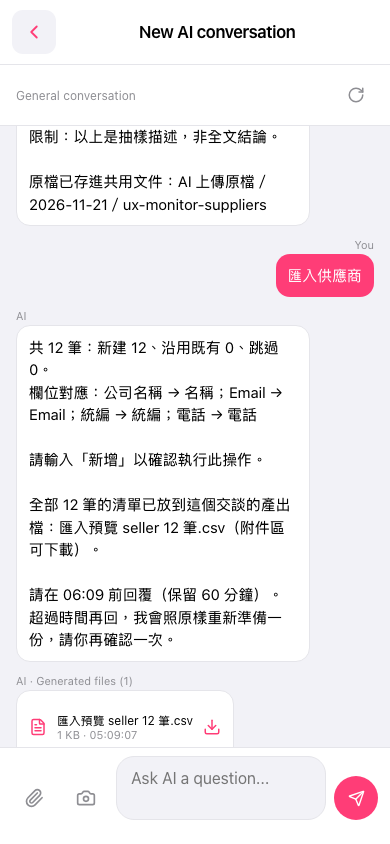 手機版|New AI conversation