
1. In V5, open the details page of the PI copy you want to pay for. Check the PI number, amount, and status (Awaiting payment / Unpaid) at the top of the page. 2. Scroll down and check the seller information, shipping information, and Item list (SKU, unit price, quantity, and subtotal). If changes are needed, click [Edit] in the upper-right corner to edit the entire PI, or [Edit] at the far right of an item row to edit only that item. 3. Click the blue [Pay online] button in the upper-right corner. 4. The system opens the payment page in a new tab. This page has a [Proceed to payment] button. 5. Click [Proceed to payment], then follow the on-screen instructions to complete the online payment through PAYUNi. Opening the payment page without clicking [Proceed to payment] does not make a payment or change the PI’s contents.
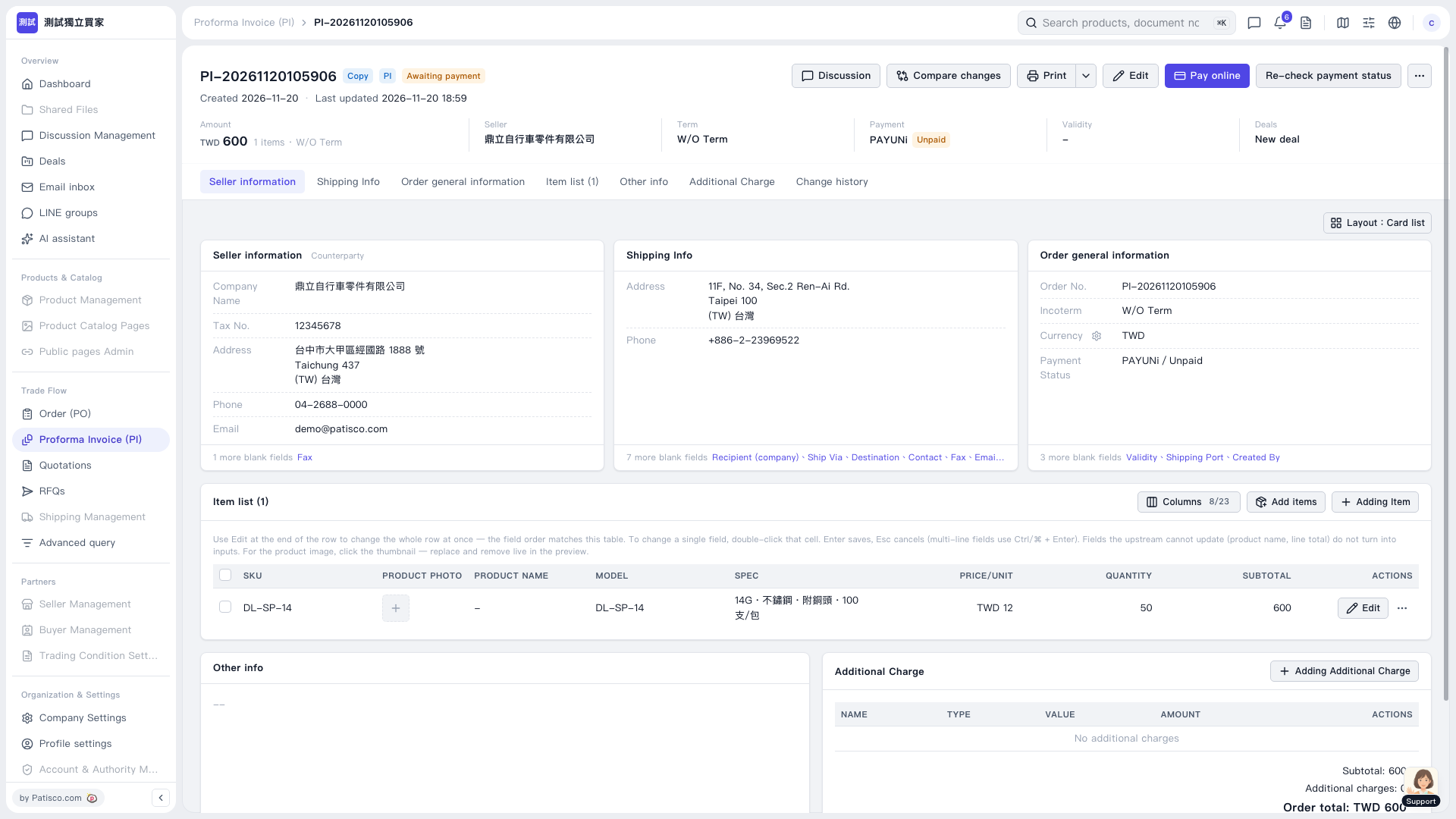 V5 新桌面版|PI-20261120105906(Proforma Invoice 詳情頁,狀態:Copy / PI / Awaiting payment)