
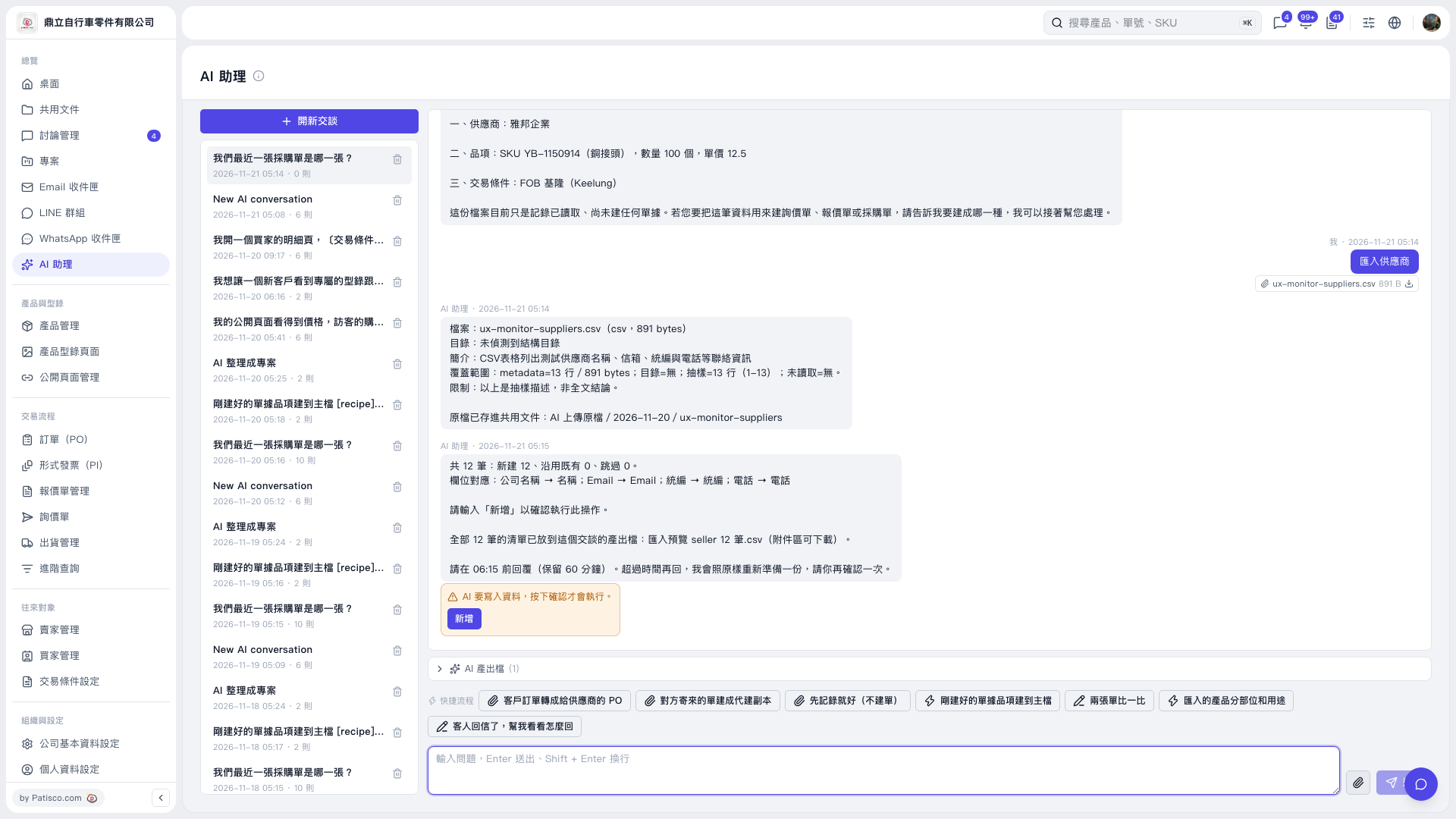
1. In AI assistant, click "Attachment" to attach the supplier CSV file, enter your request in the question/instruction box, and click "Send." For example: "Please import the supplier data in this CSV." 2. Review the import preview provided by AI. Check the counts of records to be created, existing records to be reused, and records to be skipped, as well as the field mappings: "Company name → Name," "Email → Email," "Unified Business Number → Unified Business Number," and "Phone → Phone." AI will respond: "Please enter 'Add' to confirm this operation." 3. Click "AI-generated files (1)" to expand the list, download the supplier import preview CSV, and review the data. 4. After confirming that the data is correct, click "Add" in the orange confirmation box within the time limit shown on screen, or enter "Add" and send it as instructed by AI. AI requires confirmation before writing data. 5. Check AI's follow-up response to confirm the result. If the time limit has expired, ask AI to prepare the preview again, then review and confirm it.
 V5 新桌面版|AI 助理