
1. Enter your request to AI in the Ask AI a question... message field. For example: “Import suppliers (CSV).” 2. Review the number of records to import and the processing results listed by AI, and verify the field mappings: Company Name → Name, Email → Email, Tax ID → Tax ID, Phone → Phone. 3. In the Generated files attachment area, tap the download icon (down arrow) on the right side of the CSV attachment card to download the preview file and check the data. 4. AI will respond: “Please enter ‘新增’ to confirm this action.” After checking the data, enter “新增” in the input field and tap the send button (paper airplane) in the lower right before the deadline shown on the screen. If the deadline has passed, ask AI to prepare the operation again, then confirm it again.
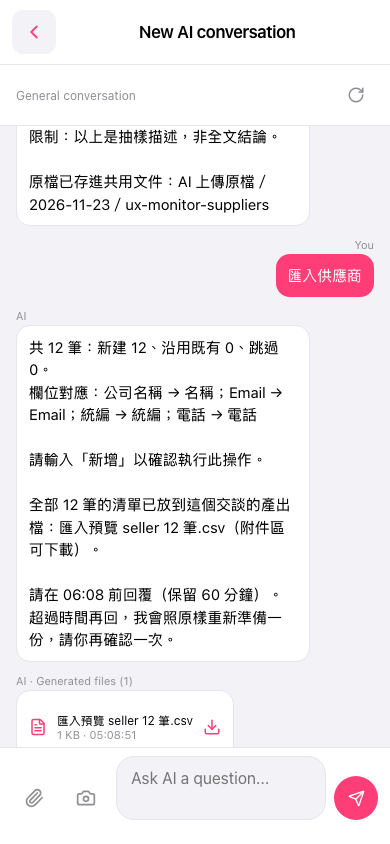 手機版|New AI conversation