
1. Scroll up in the "Add Item" panel on the right and check the SKU, model, specifications, unit price, quantity, and "Minimum Order Quantity (MOQ)". 2. Set "Use Custom Unit Price (turn off to calculate based on price tiers)". It is currently on. Turn it off to calculate based on price tiers, and check the "Subtotal Preview". 3. Under "Packaging and Volume", select the "Volume Unit" and "Weight Unit", then enter the "Length", "Width", and "Height". The system will calculate the volume automatically. 4. Enter the "Net Weight per Carton", "Gross Weight per Carton", and "Quantity per Carton". Fill in "Description" and "Secret Notes" as needed. "Secret Notes" are visible only to accounts on our side and will not appear in external reports or catalogs. 5. Click "Save" at the far right of the bottom of the panel to finish adding the item. The button is currently only partially visible.
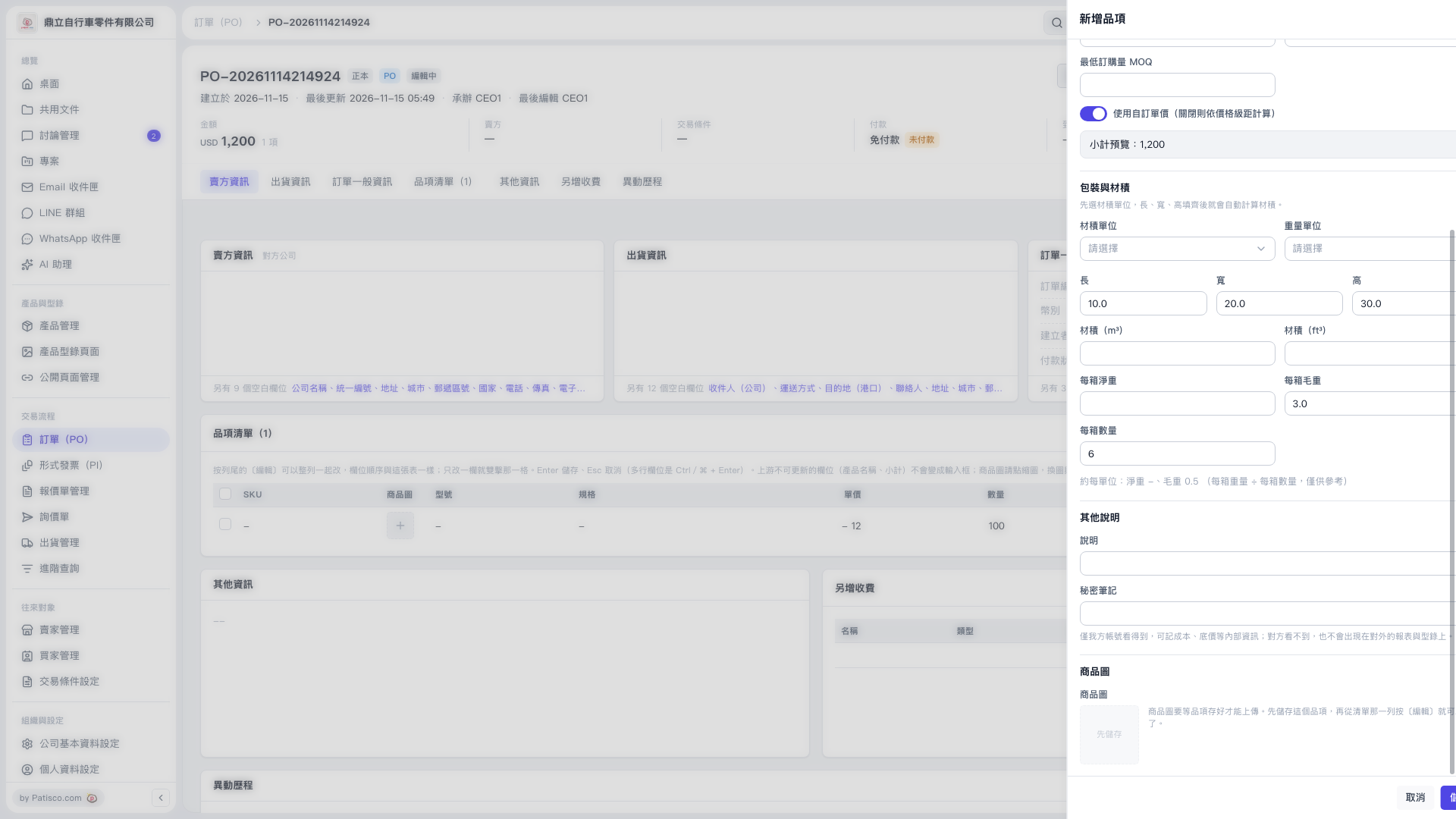 V5 新桌面版|PO-20261114214924(新增品項)