
1. On mobile, go to the [Personal Profile Settings] page. 2. Tap "Passkey (Touch ID / Face ID)" and the Passkey pop-up opens. 3. Check the "Registered Passkeys" list first to see which devices are already registered. 4. Tap the blue [Add Passkey] button. 5. Follow the system prompt and verify with your fingerprint or face recognition. 6. When verification succeeds, a message says the Passkey was added, and one more Passkey appears in the list, showing the device name, creation date, storage location (this device only), and creation time. A newly created Passkey is marked "Not used to log in yet." 7. Once everything looks right, tap [Done] at the top right to close the pop-up and return to the Personal Profile Settings page.
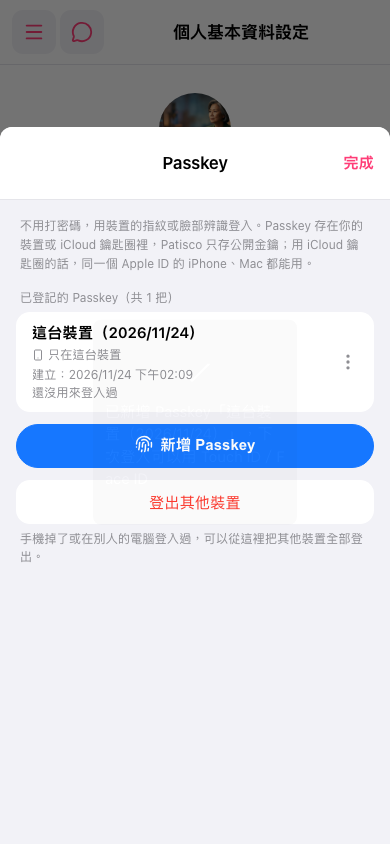 手機版|Passkey(個人基本資料設定頁面上的 Passkey 底部彈窗)