
1. Click [Edit] to enter edit mode. You can then change seller-editable details such as buyer information, shipping information, and the expiration date. 2. If there are links for blank fields at the bottom of an information card, such as “Expiration Date”, “Port”, “Shipping Method”, or “Destination (Port)”, click a link to quickly fill in that field. 3. At the upper right of the “Item List”, use [Add Items] to select from the product library, or [Create Item] to add an item manually. Then check the unit price, quantity, and subtotal. 4. For more actions on an individual item, click [⋯] in the action column at the far right of its row. 5. Click [Save] when you finish. When you need to notify the buyer that online payment is available, click [Notify the Other Party That Online Payment Is Available] at the upper right. The buyer can then pay through PAYUNi. Reminder: If you click [Cancel] to leave without clicking [Save], your changes will not be kept.
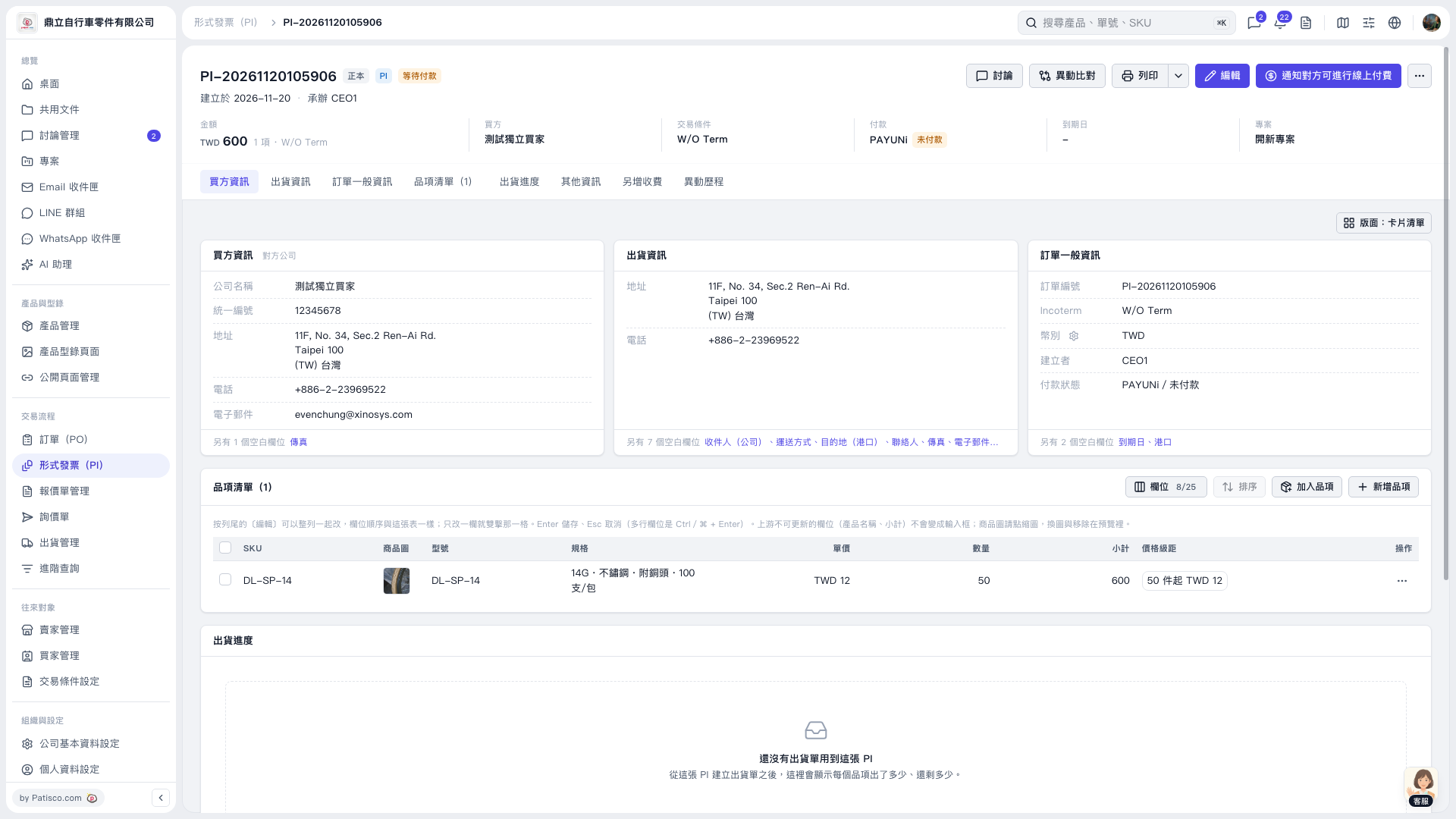 V5 新桌面版|PI-20261120105906(形式發票詳情)