
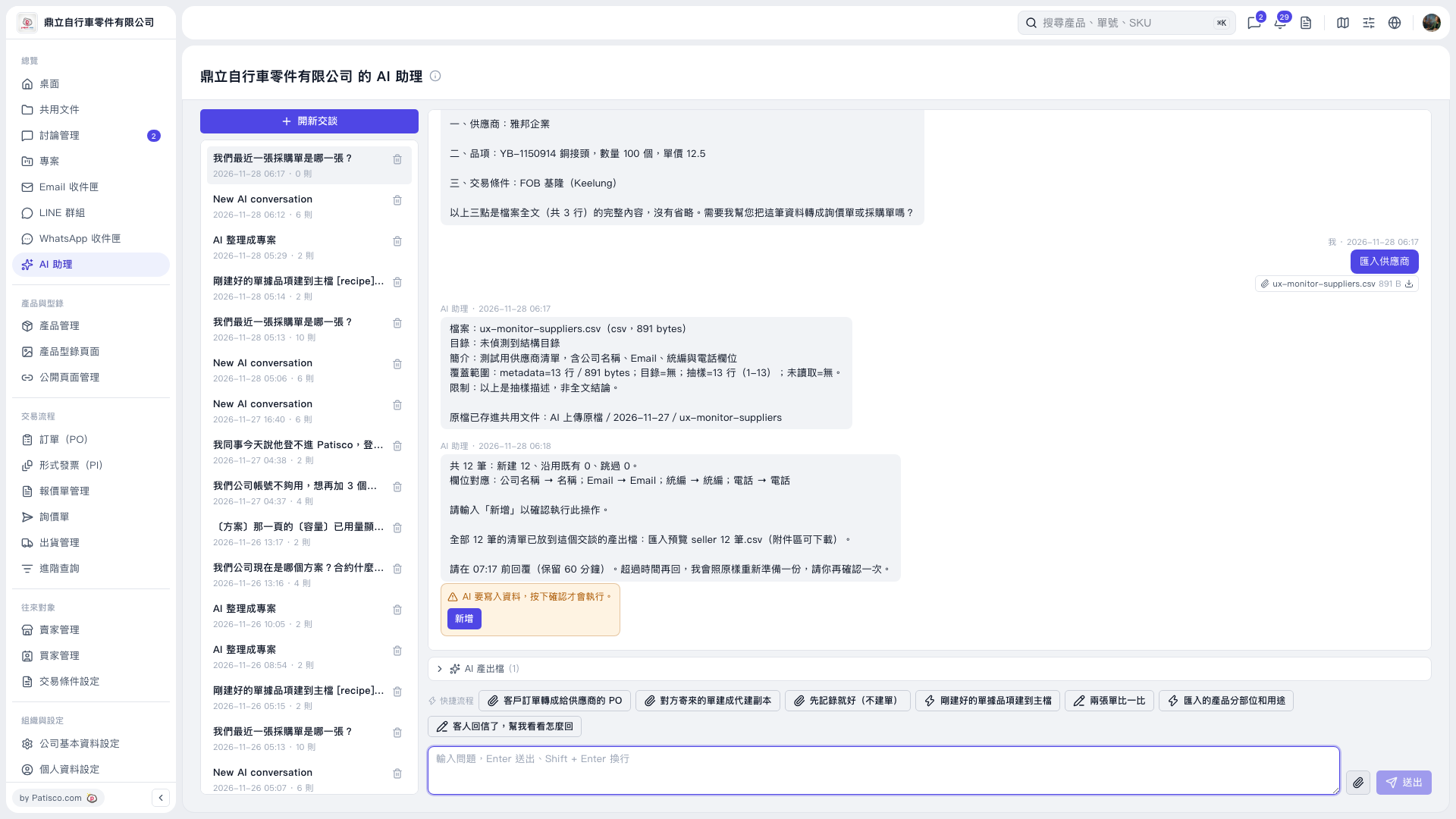
1. Open the “AI assistant” in V5 and enter the conversation you want to work with. 2. Click “AI-generated Files (1)” at the bottom of the conversation area to expand the file list. 3. Find the preview file generated by the AI, with a name similar to “Import Preview seller N Records.csv”, then download it and check the supplier data. 4. Compare it with the “Field Mapping” in the AI's reply, such as Company Name → Name, Email → Email, Unified Business Number → Unified Business Number, and Phone → Phone. Confirm that both the record count and fields are correct. Example request: “Import suppliers”. Attach the CSV file using the paperclip icon to the right of the message input box. The AI will summarize how many records will be newly created, reused from existing records, or skipped, list the field mappings, and ask you to enter “Add” to confirm execution. The complete list will be available in the generated files for this conversation.
 V5 新桌面版|鼎立自行車零件有限公司 的 AI 助理