
1. Go to the Purchasing Order page and first confirm whether the tab at the top is Sent Doc. or Received Doc.. 2. To find a specific PO, tap the search icon at the top right and enter the PO number or supplier. 3. To narrow down the results, tap the filter icon at the top right (the slider icon) and set conditions. 4. Check the status label on each entry to tell its progress: Both Parties Confirmed (both parties have confirmed), Negotiating (under negotiation), or Editing (being edited). 5. Tap an entry to view its details or continue editing. Tap the "⋮" on the right of the entry to perform the actions available for that PO. 6. For other functions, tap "⋯ More" at the top right. If you run into problems, you can also tap the customer service icon at the bottom right for help.
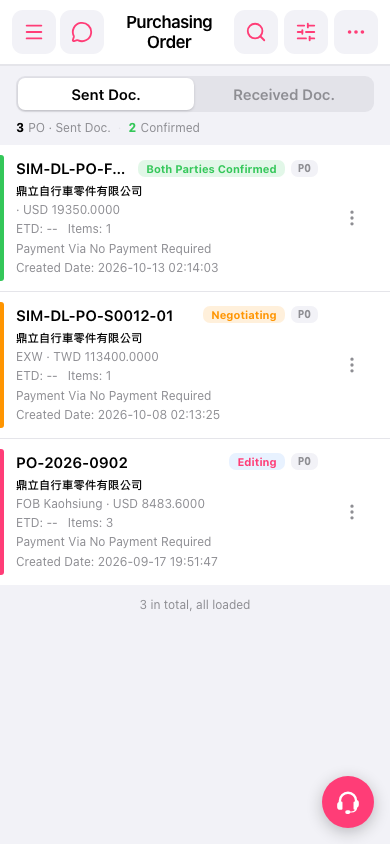 手機版|Purchasing Order(採購單)