
1. Go to "Discussion Management" and select "PI-0411 · Hongtai Shipment". 2. In the central conversation, find the incoming message labeled "Email". To see the full content, click "View original email" below the message. 3. To reply to the customer, type your message in the input box and click "Reply by Email" at the bottom right of the box. The email will be sent to the external party (for example Jonas Berger). 4. To pass the content to the supplier on LINE, type your message and click "Send to LINE group". It will be sent to the linked LINE group "Hongtai". 5. To quote the content of an email, hover over the message and use "Copy", "Reply", or "Quote" on the floating toolbar.
You can ask the AI like this: quote the email content (for example, Jonas Berger wrote that one carton is missing from PI-0411 and one model number is wrong), then ask the AI to help organize how to handle it.
The AI might reply like this: Based on the email you quoted, it summarizes two issues, a shortage and a model number error, and suggests first checking the shipping records internally and then replying to the customer.
In addition, the "Reference documents" card on the right lets you view the buyer, seller, trading conditions, and amount of PI-0411, and you can also open it for editing.
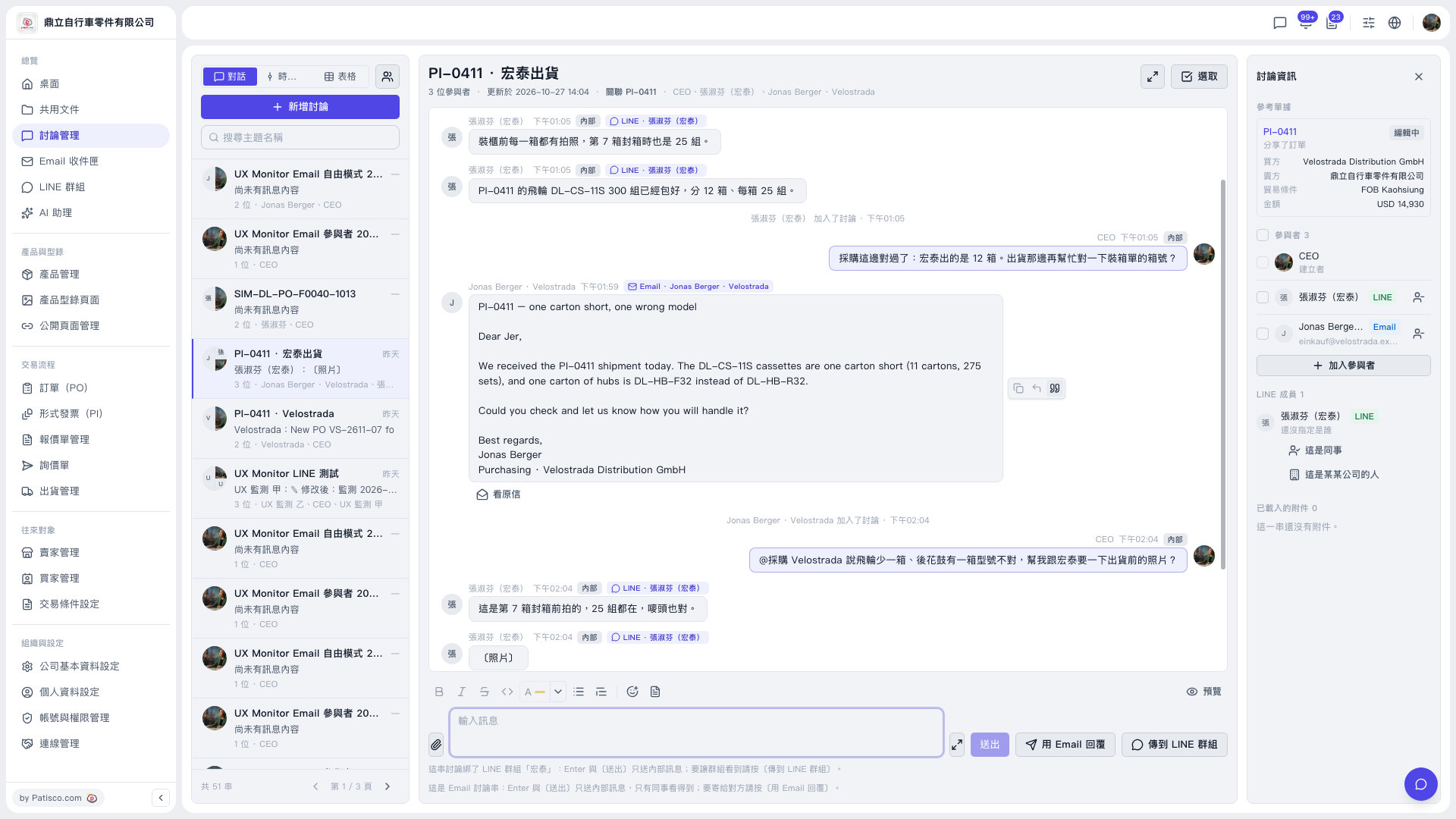 V5 新桌面版|討論管理(討論串:PI-0411 · 宏泰出貨)