
1. On the Product Management page, open the "Bulk create products" dialog and go to Step 3 (Value mapping). 2. First look at the "Currency" section and confirm it shows "All matched", meaning TWD in the file is mapped to "(TWD) New Taiwan Dollar". To change it, choose again from the dropdown in the "Map to" column. 3. If the whole batch of products belongs to the same supplier or buyer, select the supplier and buyer under "Ownership of this batch". If you can't find them, click "Add supplier" (left) or "Add buyer" (right). If you don't need this, leave it as "Leave blank". 4. Under "What to use when blank", set the default values for pricing unit, currency, dimension unit and weight unit. These values are applied to empty cells in the file; you can also leave them empty. 5. Scroll down to the "Price" section and check the value for "When there is a unit price but no MOQ" (default is 1, meaning no quantity limit). Change it if needed. 6. Click "Next" at the bottom right to go to Step 4, "Review and fix", and check the data before importing. To go back and change the column mapping, click "Back" to return to Step 2. If you don't want to import, click "Cancel".
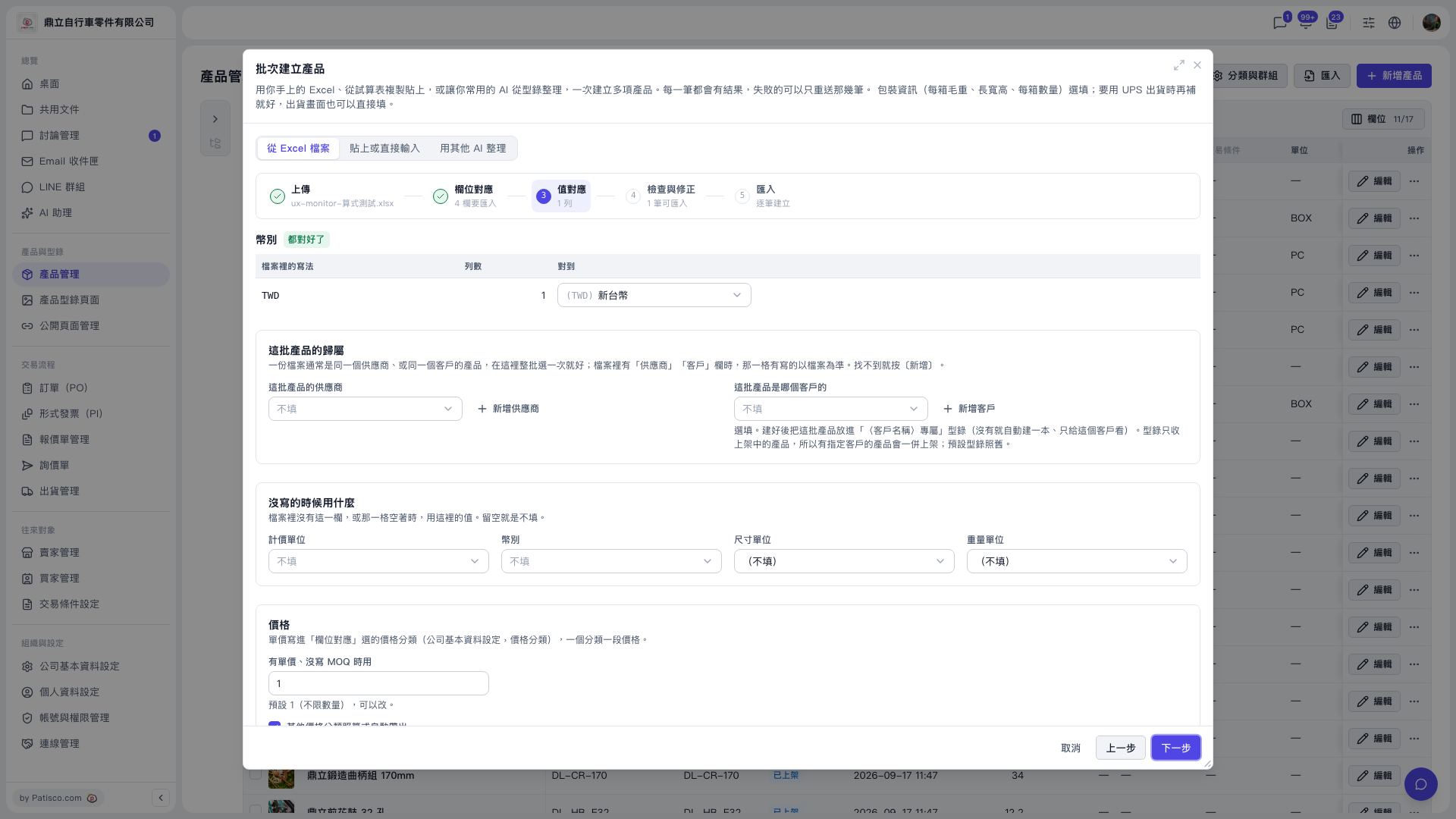 V5 新桌面版|批次建立產品(產品管理頁面上的對話框)