
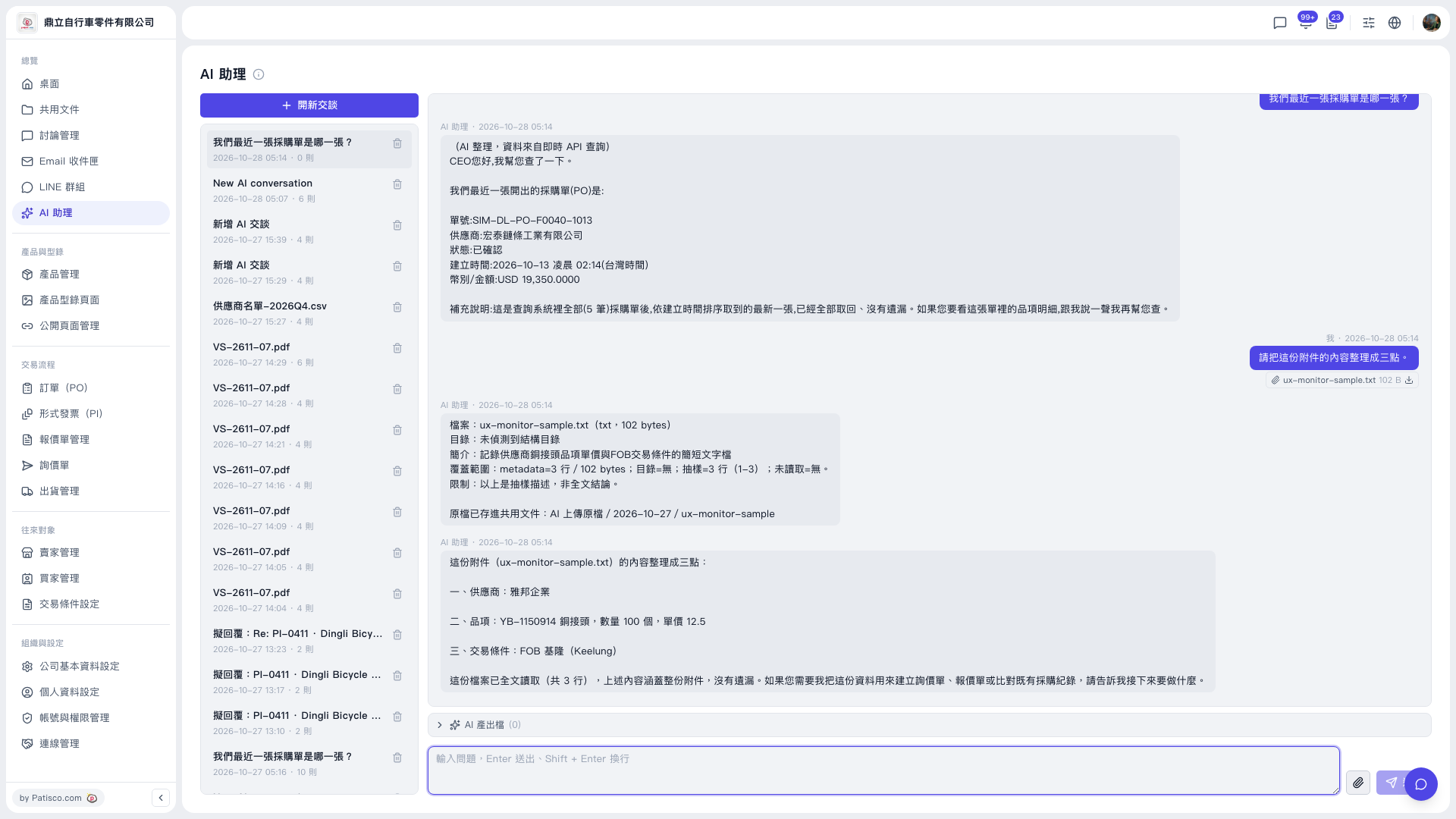
1. Click “AI assistant” in the left sidebar to open the page. 2. Click “New chat” to start a new conversation (or select an existing one from the conversation list on the left to continue). 3. Click the paperclip icon on the right side of the input box and upload the file you want analyzed. 4. Type your question in the input box at the bottom of the page. 5. Press Enter to send (Shift + Enter for a new line), or click the paper plane icon at the bottom right of the input box. 6. Read the AI's reply in the conversation area.
You can ask, for example: “Please summarize this attachment in three points.” How the AI replies: using the test file ux-monitor-sample.txt as an example, the AI first lists the file information and the range it read, then summarizes it in three points: supplier (雅邦企業), item (YB-1150914 copper fitting, quantity 100 pcs, unit price 12.5), and trading conditions (FOB Keelung). It then asks whether you want to go on to create an inquiry or quotation, or compare against PO records.
 V5 新桌面版|AI 助理