
1. In the PO list, each card has a colored bar on its left along with a status label: green means both parties have confirmed (Both Parties Confirmed), orange means negotiating (Negotiating), and pink means editing (Editing). 2. Each card also shows the PO number, a version label (for example P0), the seller name, trading terms and currency amount (for example EXW/FOB・USD/TWD), ETD, Items (number of items), Payment Via (payment method), and Created Date. 3. To find a specific PO, tap the "search icon" at the top right and enter the PO number or seller name. 4. To narrow down the list, tap the "filter/adjust icon" to the right of the search icon to open the filter and sort settings. 5. Once you find it, tap the card to open the detail page and view the items, amounts, and conditions. 6. To perform other actions on a single PO, tap the "⋮" menu on the right side of the card and select the function you need.
If you need help, tap the customer support icon (headset) at the bottom right.
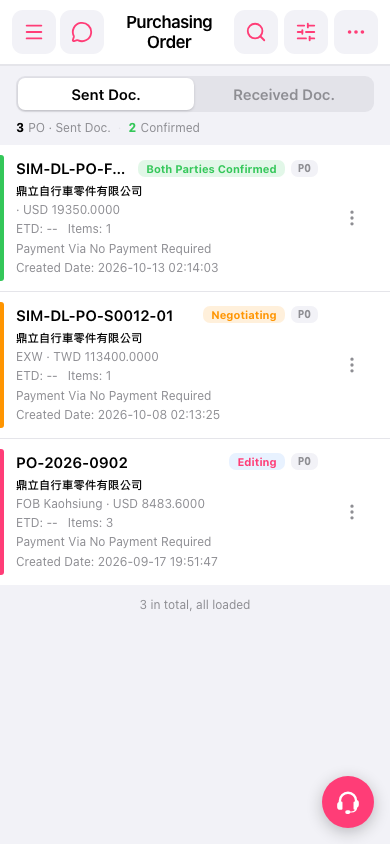 手機版|Purchasing Order(採購單)