
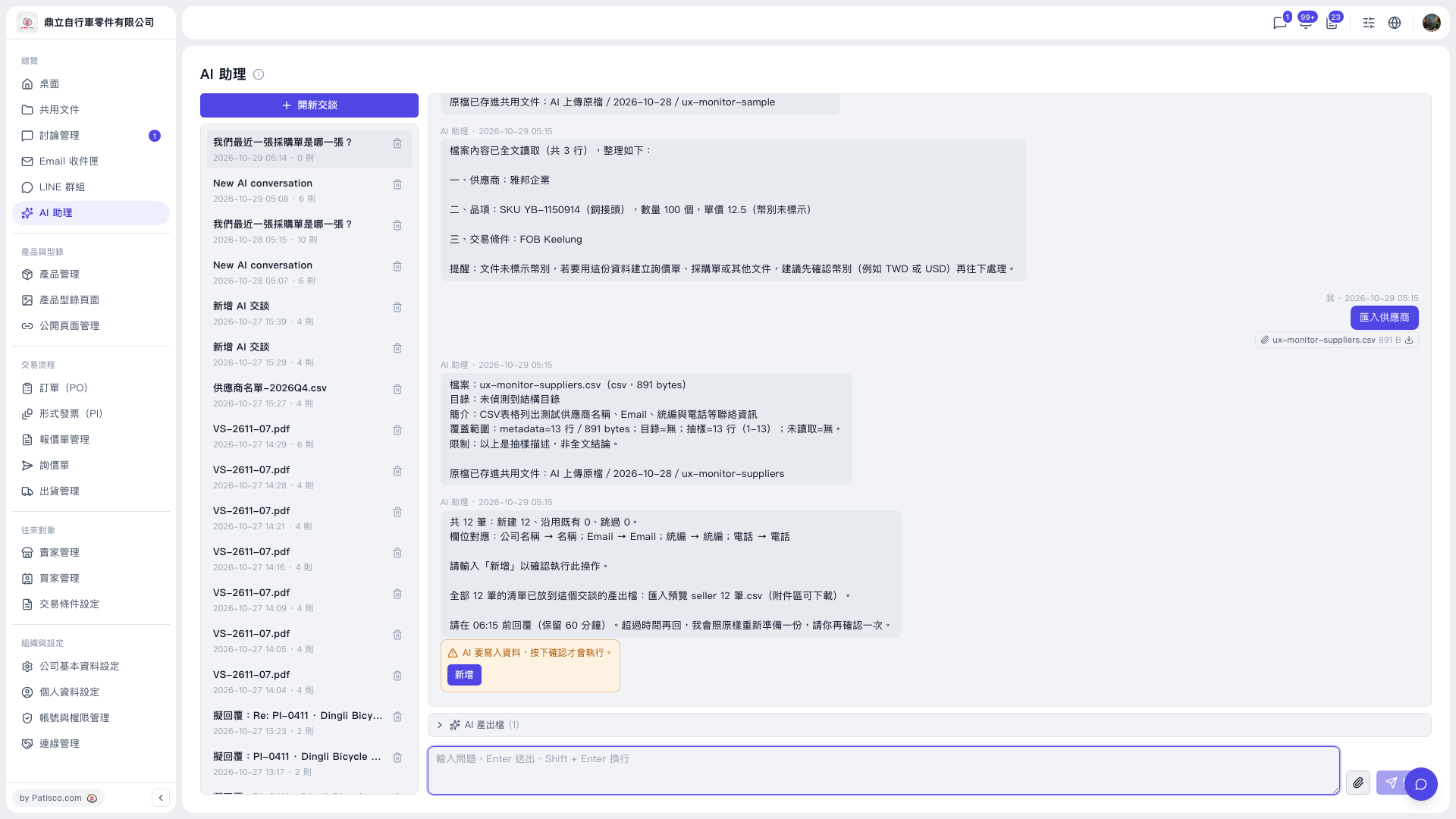
1. Click "AI assistant" in the left sidebar to open the AI assistant page. 2. Click "New chat" at the top of the conversation list on the left. 3. Click the paperclip icon on the right of the input box and upload the CSV to import, for example ux-monitor-suppliers.csv. 4. Type "Import suppliers" in the input box and press Enter to send (Shift + Enter for a line break). 5. Wait for the AI to reply with a file summary, field mapping, and a count preview, and first check the numbers of new, reused, and skipped records. 6. Once everything looks correct, click the "Add" button in the yellow confirmation box below the conversation area to run the import (the AI will also ask you to type "Add" to confirm).
You can ask: "Import suppliers" (with a 12-row CSV attached). The AI will reply: "12 records in total: 12 new, 0 reused existing, 0 skipped. Field mapping: Company name → Name; Email → Email; Tax ID → Tax ID; Phone → Phone. Please type "Add" to confirm this operation."
 V5 新桌面版|AI 助理