
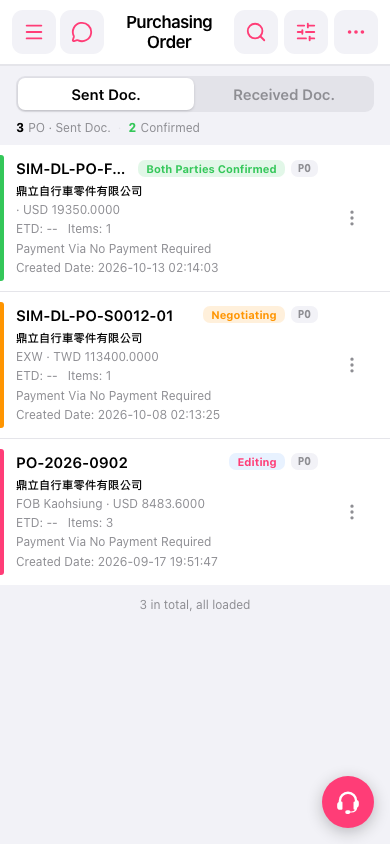
1. Open the mobile version and go to the "Purchasing Order" (PO) page (https://mobile.patisco.com/main/po). 2. Look at the tabs below the title. By default it is on "Sent Doc.", which shows the POs you have sent. 3. To view POs the other party has sent to you, tap "Received Doc."; to switch back, tap "Sent Doc." again. 4. Each card in the list shows the document number, a status label (Both Parties Confirmed / Negotiating / Editing), the supplier name, trading terms and amount (such as EXW · TWD 113400.0000), ETD, Items, Payment Via, and Created Date. You can judge progress by the color bar on the left and the status label.
 手機版|Purchasing Order(採購單)