
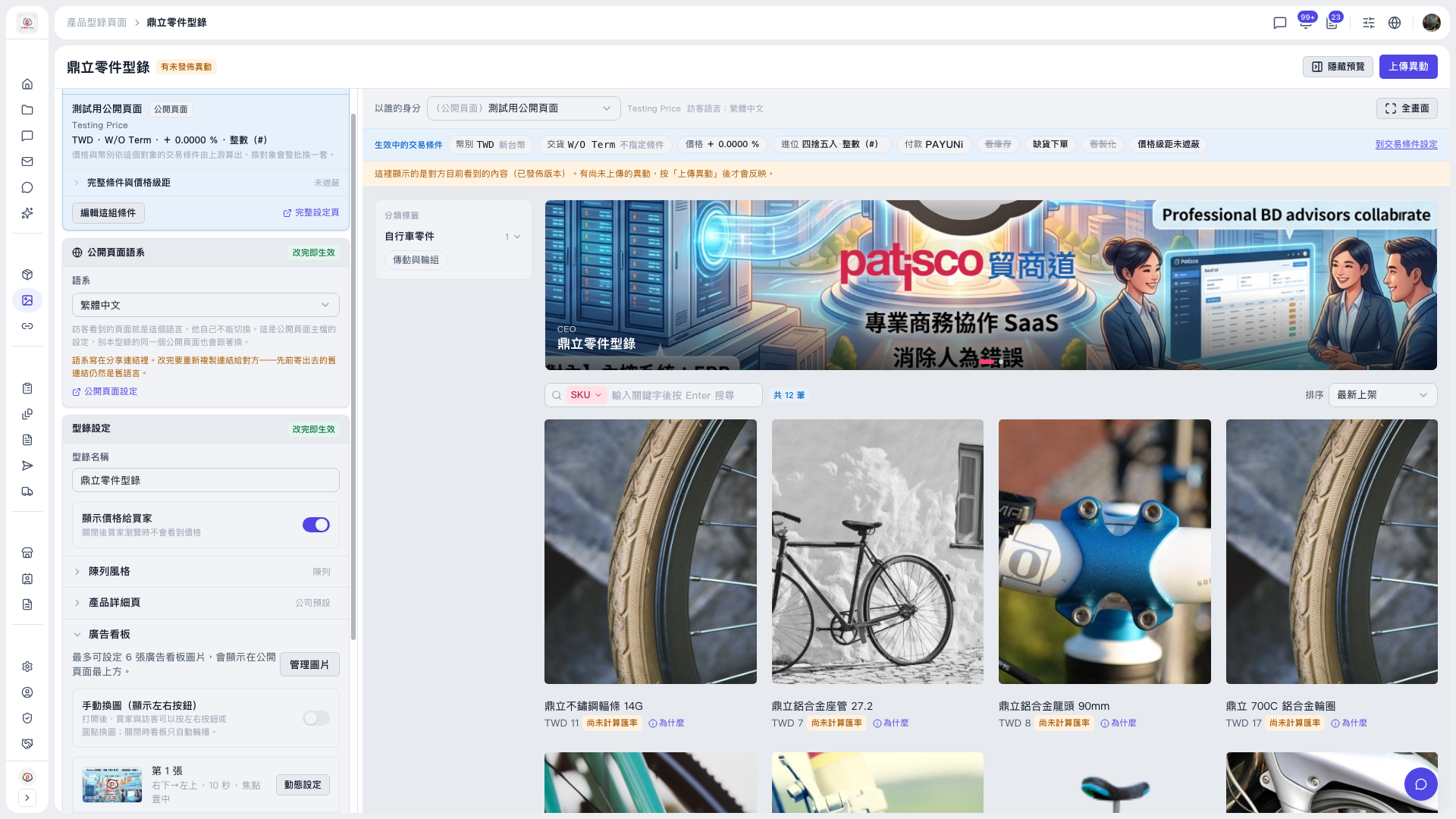
1. In the "Catalog Settings" section on the left, confirm the catalog name and decide whether to turn on the "Show prices to buyers" toggle. 2. In the "Public page language" section, use the "Language" dropdown to choose the language visitors see. 3. Above the preview area on the right, use the "View as" dropdown to switch between a buyer identity or the public page, and check the content and prices that person actually sees. If the preview area is collapsed, click "Hide preview" at the top right to show it again; to see it larger, click "Full screen" at the top right of the preview area. 4. To check the product list, use the "SKU search and sort" above the product list in the preview area. The current sort order is "Newest". 5. When everything is correct, click "Upload Changes" at the top right to publish. Buyers will only see the latest content after this. 6. To change trading conditions, click "Edit this set of conditions" at the top left, or click "Full settings page" to open the full settings.
 V5 新桌面版|鼎立零件型錄