
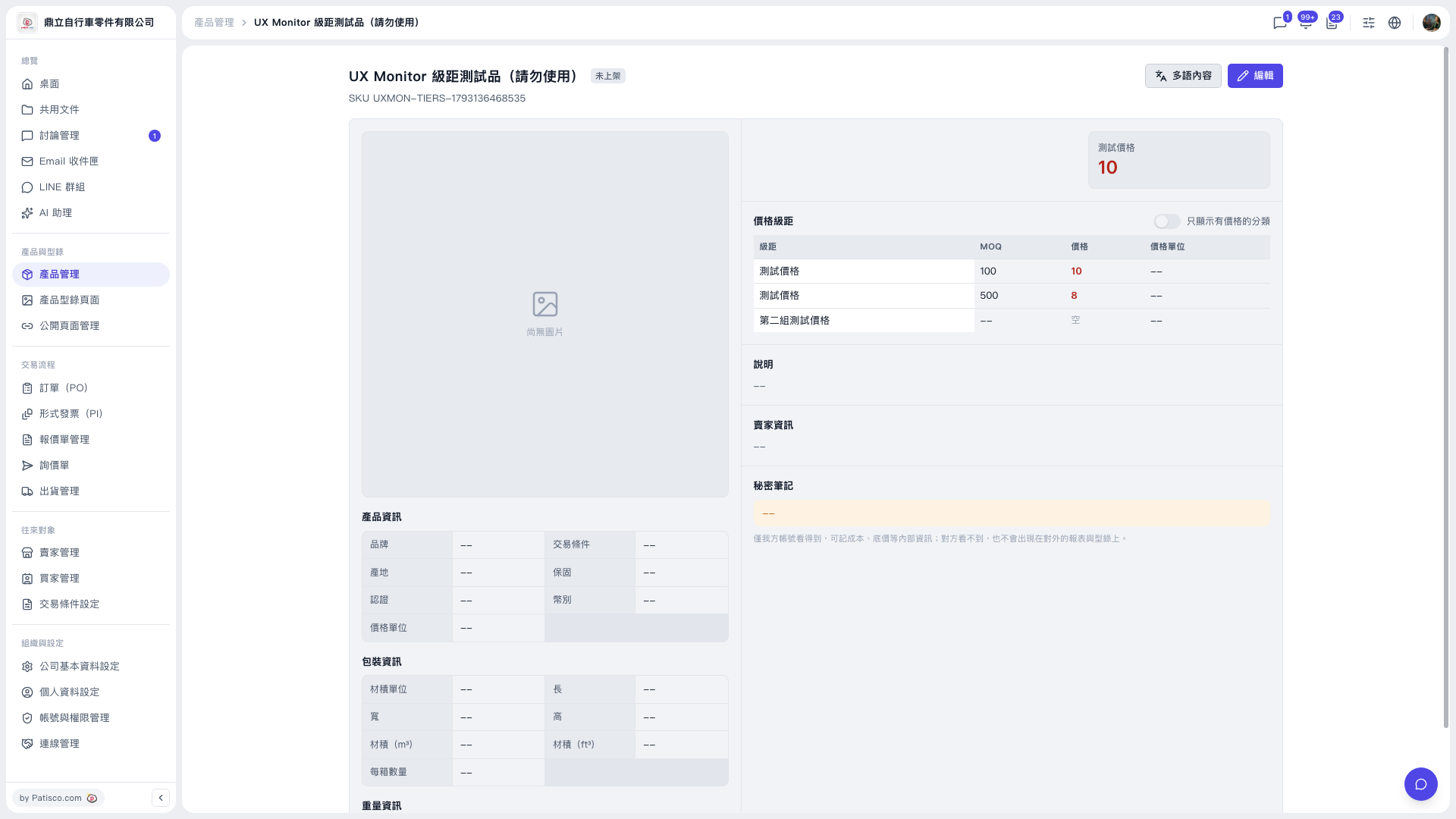
No. The minimum order quantity (MOQ) cannot be duplicated within the same price category. Steps: 1. In the left sidebar, click "Product Management" and open the detail page of the product you want to handle. 2. In the "Price Tiers" section on the right, check the MOQ, price and price unit of each existing tier. 3. Click the purple "Edit" button at the upper right to enter edit mode. 4. In the price tiers, modify or add the MOQ and price of each tier. The MOQ of each tier must be different (for example 100 and 500). 5. After saving the changes, go back to the detail page and confirm that the price tier table has been updated. If you enter a duplicate MOQ, the system blocks it and shows "Within the same price category, the minimum order quantity cannot be duplicated". Nothing is saved this time, and the original tiers remain unchanged (in the test they are still MOQ 100 → price 10, MOQ 500 → price 8).
 V5 新桌面版|UX Monitor 級距測試品(請勿使用)