
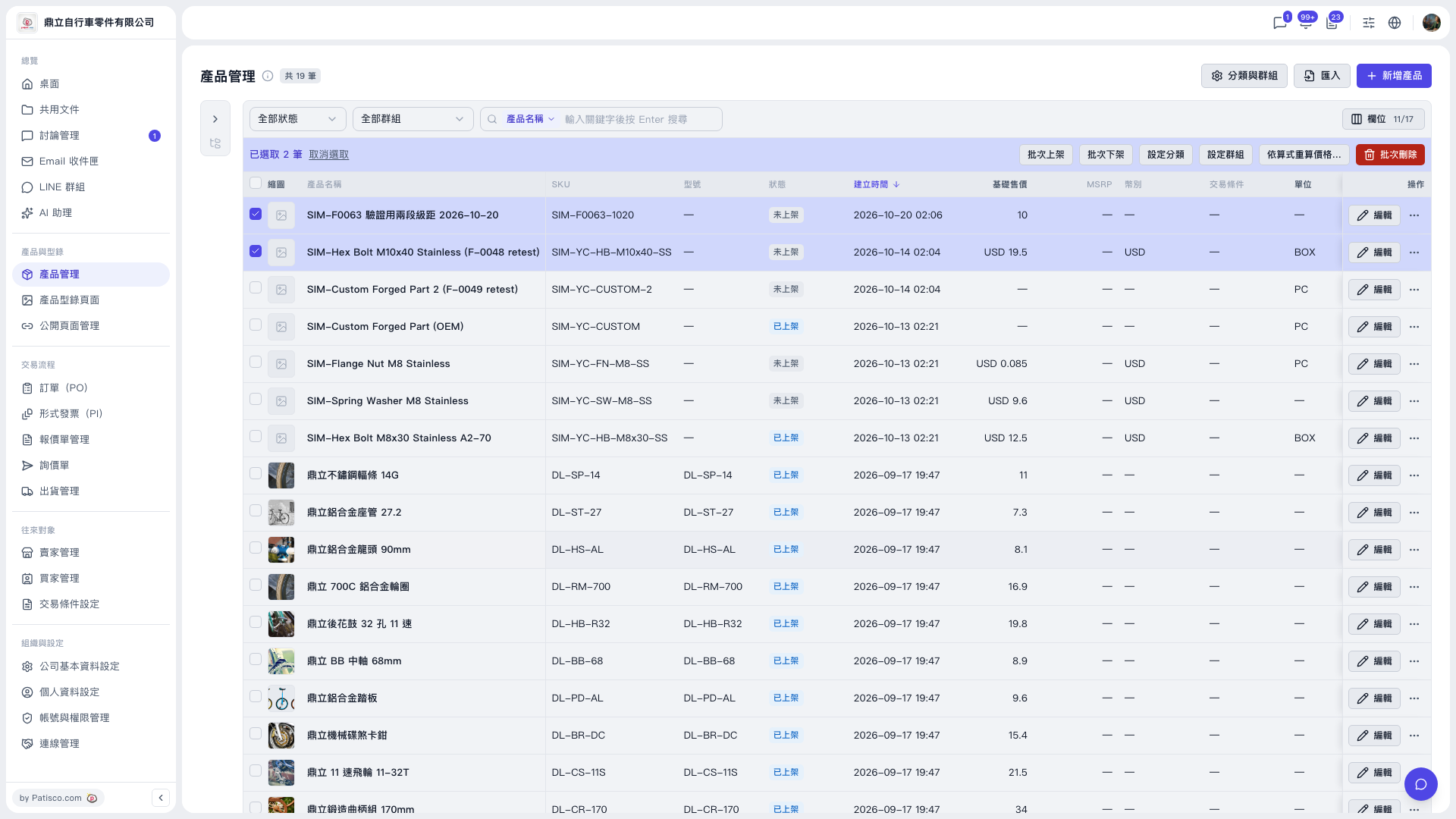
1. Go to "Products & Catalog" → "Product Management" and tick the products whose prices you want to recalculate (you can narrow down the range with filters first). 2. In the blue bulk action bar, click "Recalculate prices by formula…". 3. The system shows a preview first, listing the number of rows to be added, overwritten, kept and skipped. After checking, click the write button below (for example "Fill only" or "Overwrite all"; the button shows "Write N rows"). 4. If you don't want to apply it, don't click the write button, or click "Clear selection" to clear the checkmarks.
Actual example (demo account): the price category "Test Price" is the base, and "Second Test Price" = base −15%, rounded to an integer, MOQ same as base. After selecting 2 products, the preview result is: add 0, overwrite 0, keep 2, skip 0. Both main buttons show "Write 0 rows", which means no prices will be changed this time.
No known issues were found when testing this procedure.
 V5 新桌面版|產品管理