
1. On the Product Management page, click "Import" at the top right, choose "From Excel file" and upload the file. 2. In Step 2, "Column mapping", the system has already mapped columns automatically based on the headers. First look at the columns marked "Guessed" or "Not matched". 3. In the middle column of the table, "Map to system field", every row has a dropdown. Change the Excel column to the correct system field, and choose "Do not import" for columns you don't need. 4. Confirm that fields such as "SKU", "Product name", "Currency", "MSRP", "Tier 1 unit price" and "Tier 1 MOQ" are all mapped correctly. 5. Click "Next" at the bottom right of the dialog to go to Step 3, "Value mapping". To go back and change the file, click "Back". If you no longer want to import, click "Cancel". Note: if the MOQ cell is empty, 1 will be used.
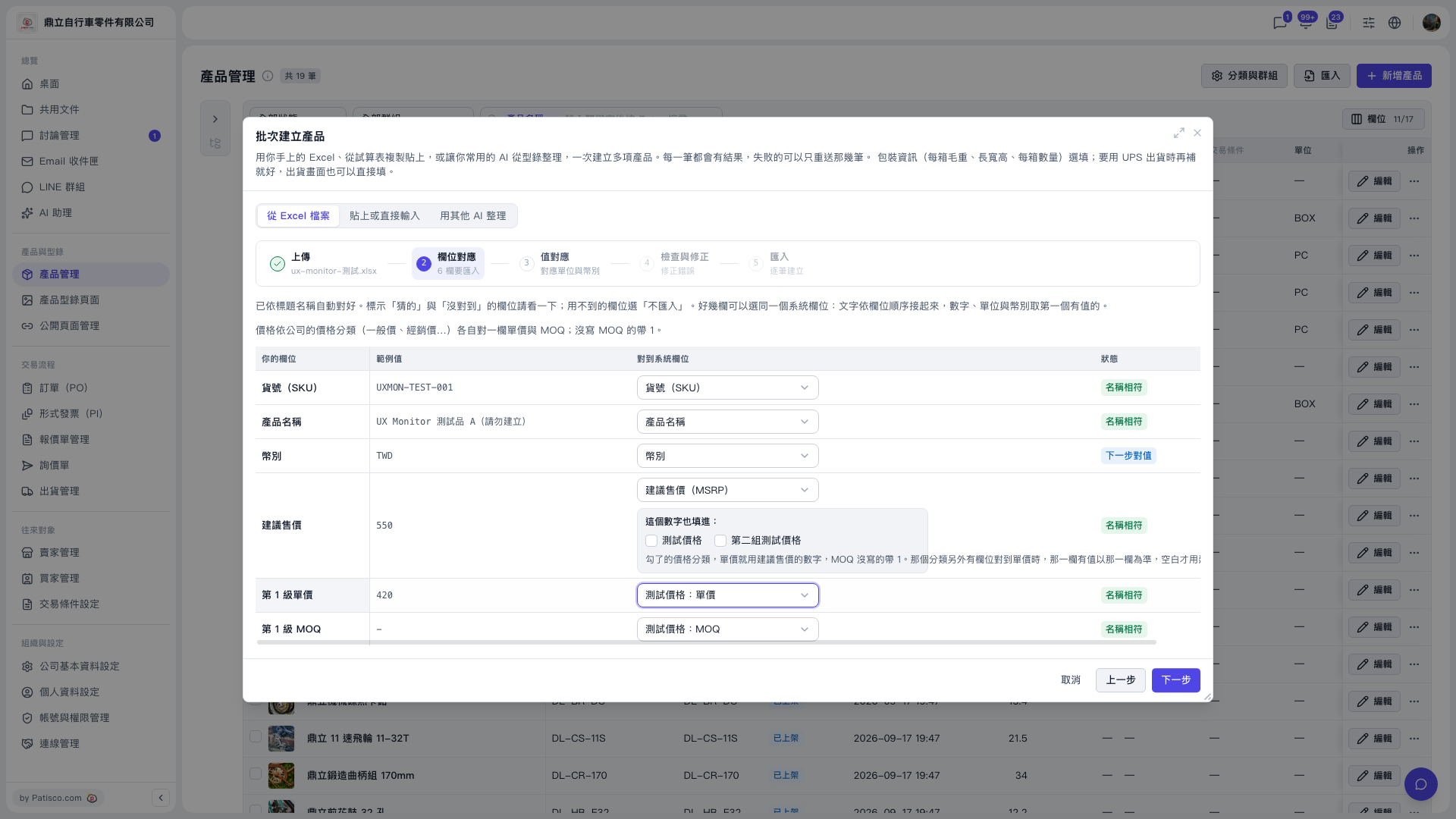 V5 新桌面版|產品管理(批次建立產品:欄位對應)