
1. In "Catalog Settings" on the left, confirm the "Catalog Name" and, as needed, toggle "Show prices to buyers" to decide whether buyers can see prices while browsing. 2. In the "Public page language" dropdown, choose the language visitors will see. The language is written into the share link, so after changing it you need to copy the link again and send it to the recipient. 3. Use the "View as" dropdown above the preview area to switch identity. The preview on the right then shows the prices and conditions that identity sees. If the preview is too small, click "Full screen". To free up space, click "Hide preview" at the top right. 4. Type a keyword into the SKU search box in the preview area and press Enter to search for products. You can also use the sort option at the top right (for example "Newest") to check the product list. 5. To change the trading conditions, click "Edit this set of conditions", or click "Full settings page" or "Go to Trading Condition Setting". 6. When everything looks right, click "Upload Changes" at the top right to publish the changes to the public page.
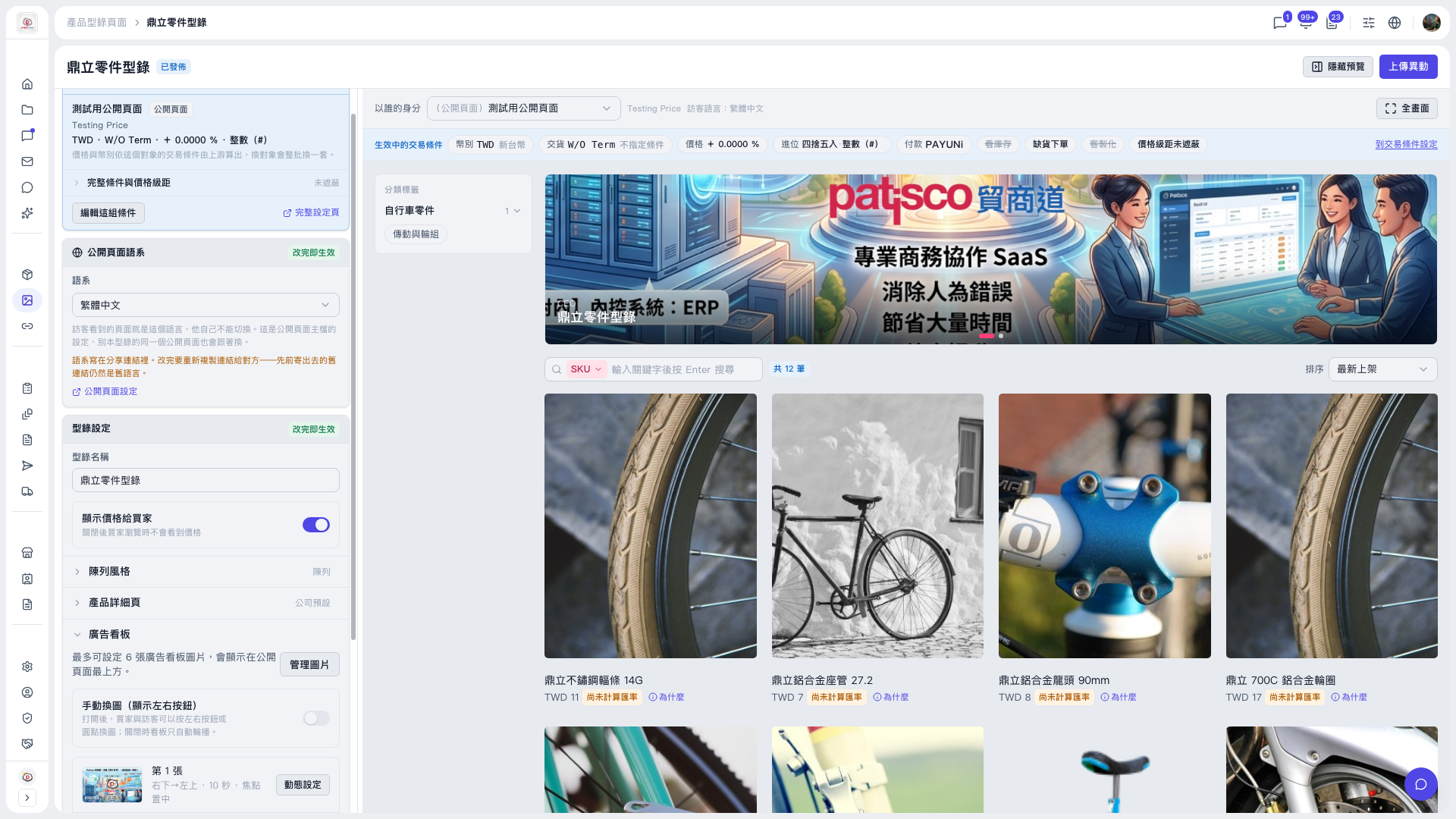 V5 新桌面版|鼎立零件型錄(產品型錄編輯頁,狀態:已發佈)