
1. In the left-hand list, click the discussion thread (for example, "PI-0411 · Hongtai Shipment") and read the messages in the central area. To see the full content, click "View original email" below the email message. 2. To reply to an external customer or buyer: type your message in the input box, then click "Reply by Email" at the bottom right. The recipient is shown on screen as Jonas Berger of Velostrada, and that is who will receive it. 3. To notify the linked LINE group (for example, Hongtai): click "Send to LINE group" at the bottom right of the input box. 4. To add people, click "Add participant" in the discussion info panel on the right. The right side also shows the buyer, seller, trading conditions, and amount of the referenced document, PI-0411.
You can ask the AI assistant like this: Summarize the key points of Jonas Berger's email (PI-0411 is one carton short, and one model number is wrong).
How the AI assistant responds: It summarizes the issues based on the content of the email, for example, that when PI-0411 was received, items such as the DL-CS-11S freewheel were short and had model number mismatches.
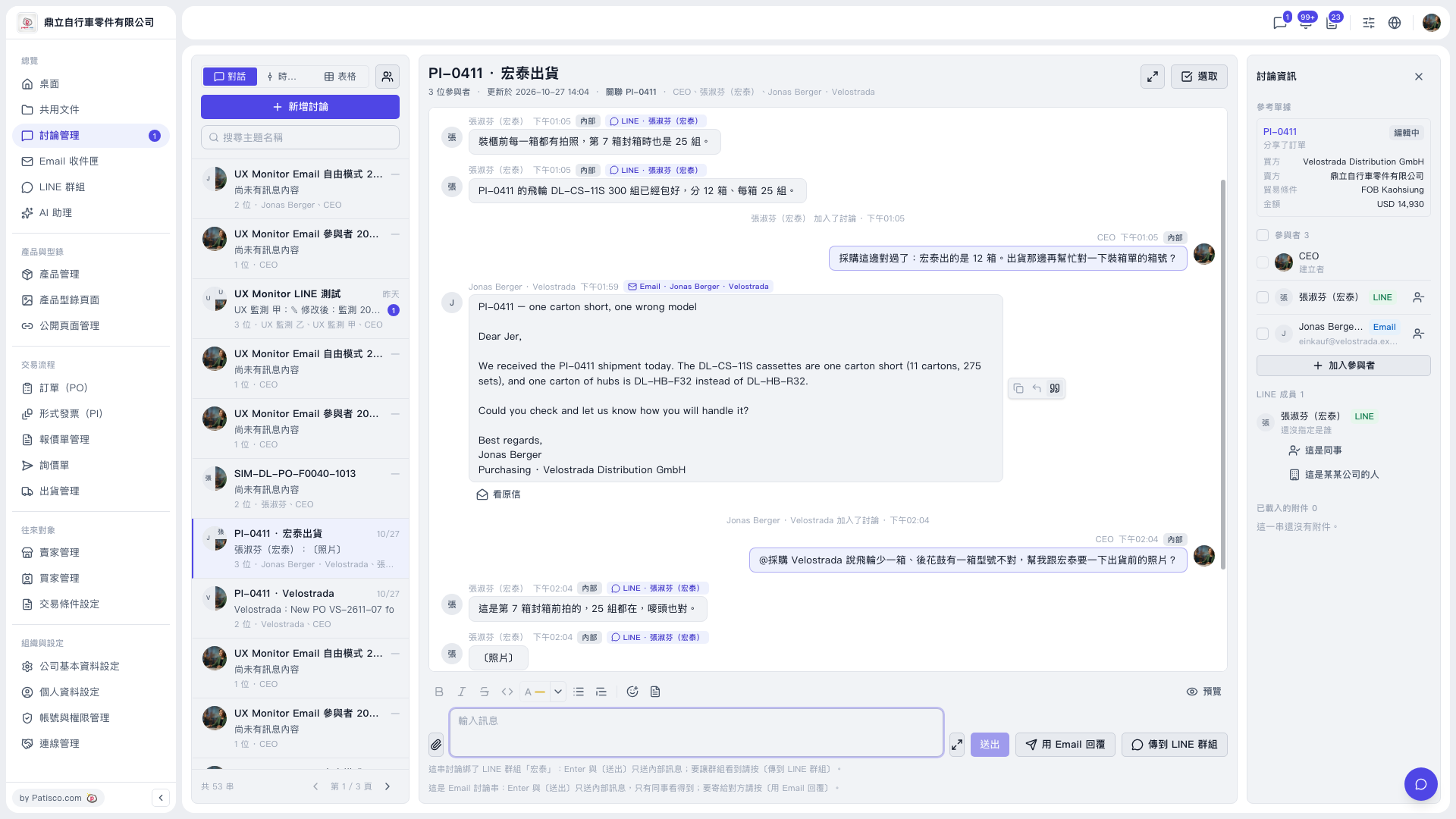 V5 新桌面版|討論管理(PI-0411 · 宏泰出貨 討論串)