
1. Click "Discussion Management" in the left sidebar to go to the discussion page. 2. In the middle list, find the thread using "Search topic name", or click "New discussion" to create a new one. 3. Click the thread (for example, SIM-DL-PO-F0040-1013). The conversation and the shared order reports are shown in the middle. 4. To send within the platform: type your message in the input box at the bottom and click "Send". If you need to attach a file, click the paperclip icon on the left of the input box to upload it. 5. To use email instead: click "Reply by email" at the bottom right of the conversation area.
Reminder: In testing, when a thread has a contact person from an external company, the system shows a notice, for example "這一串有 宏泰鏈條工業有限公司 的窗口,這封信 宏泰鏈條工業有限公司 在 Patisco 裡也看得到" (this thread has a contact from 宏泰鏈條工業有限公司, and 宏泰鏈條工業有限公司 can also see this message in Patisco). Check this kind of notice before sending to confirm the recipient.
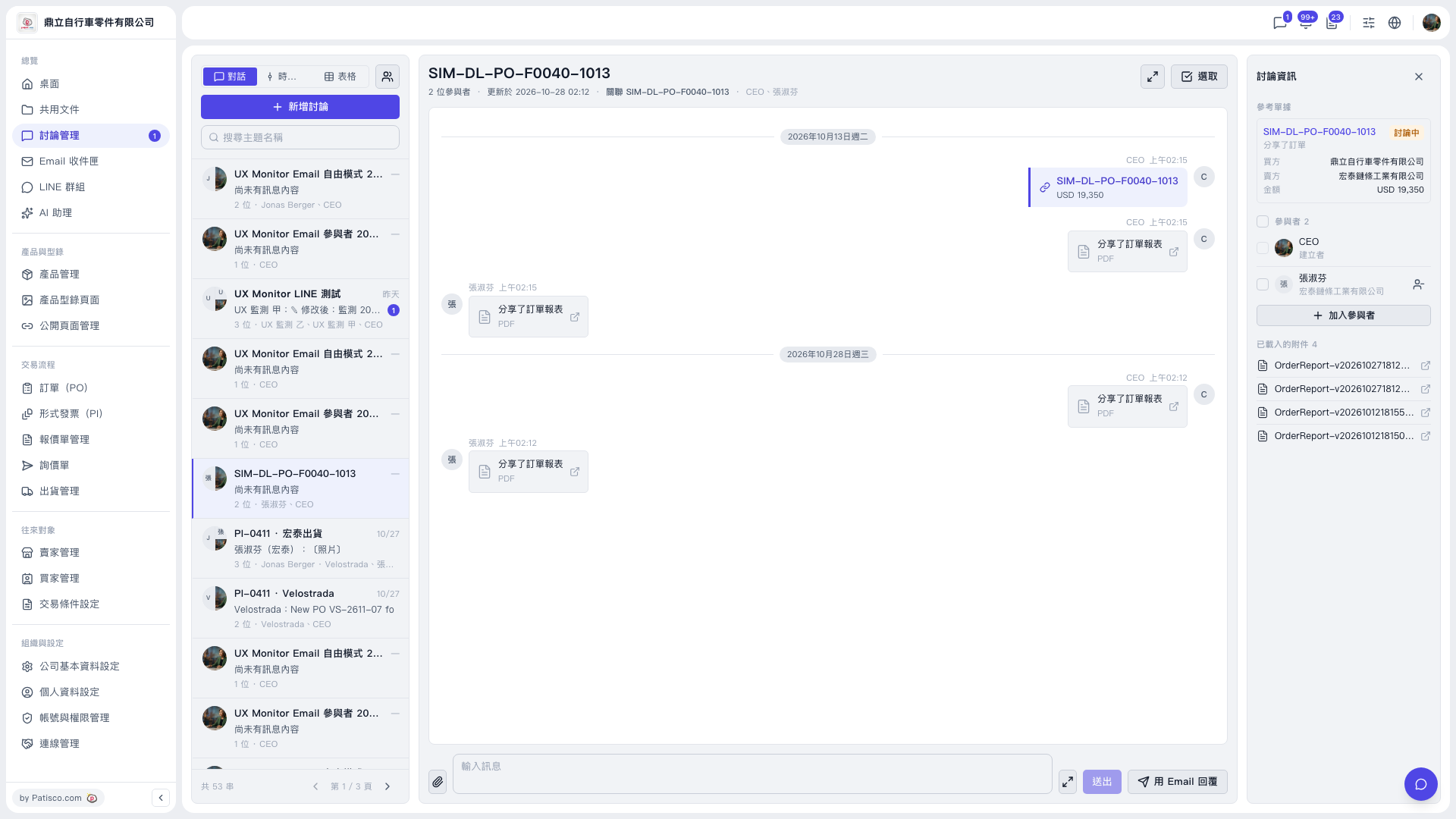 V5 新桌面版|討論管理(討論串:SIM-DL-PO-F0040-1013)