
1. In the "Items" section of the page, check the model, specifications, quantity, unit price, and price tiers. 2. To change an item, click "Edit" on the right side of its row, then press Enter to save. 3. To add an item, click "Add item" at the top right of the items section. It is saved as soon as you add it. 4. If the table has too many columns or the one you want isn't visible, click "Columns 10/24" and choose which columns to display. 5. To confirm details with the buyer, click "Discuss" at the top right to open the discussion for this inquiry. 6. Once everything is checked and correct, click the purple "Confirm" button at the top right to send our reply.
Tip: The left side of the page has a section navigation (Seller info / Buyer info / Basic info / Items / Other info / History) that lets you jump quickly to each section.
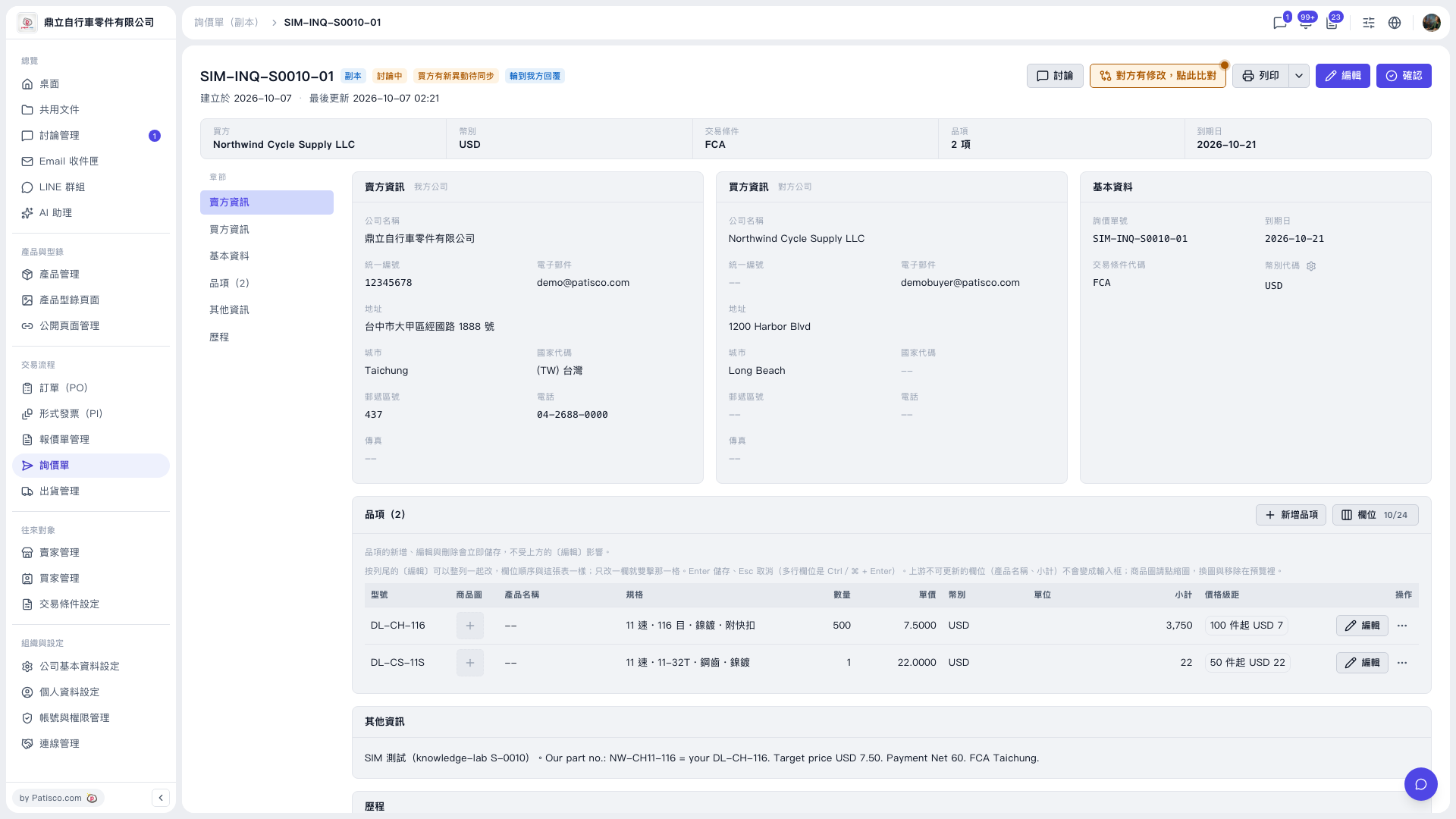 V5 新桌面版|SIM-INQ-S0010-01(詢價單詳情・副本)