
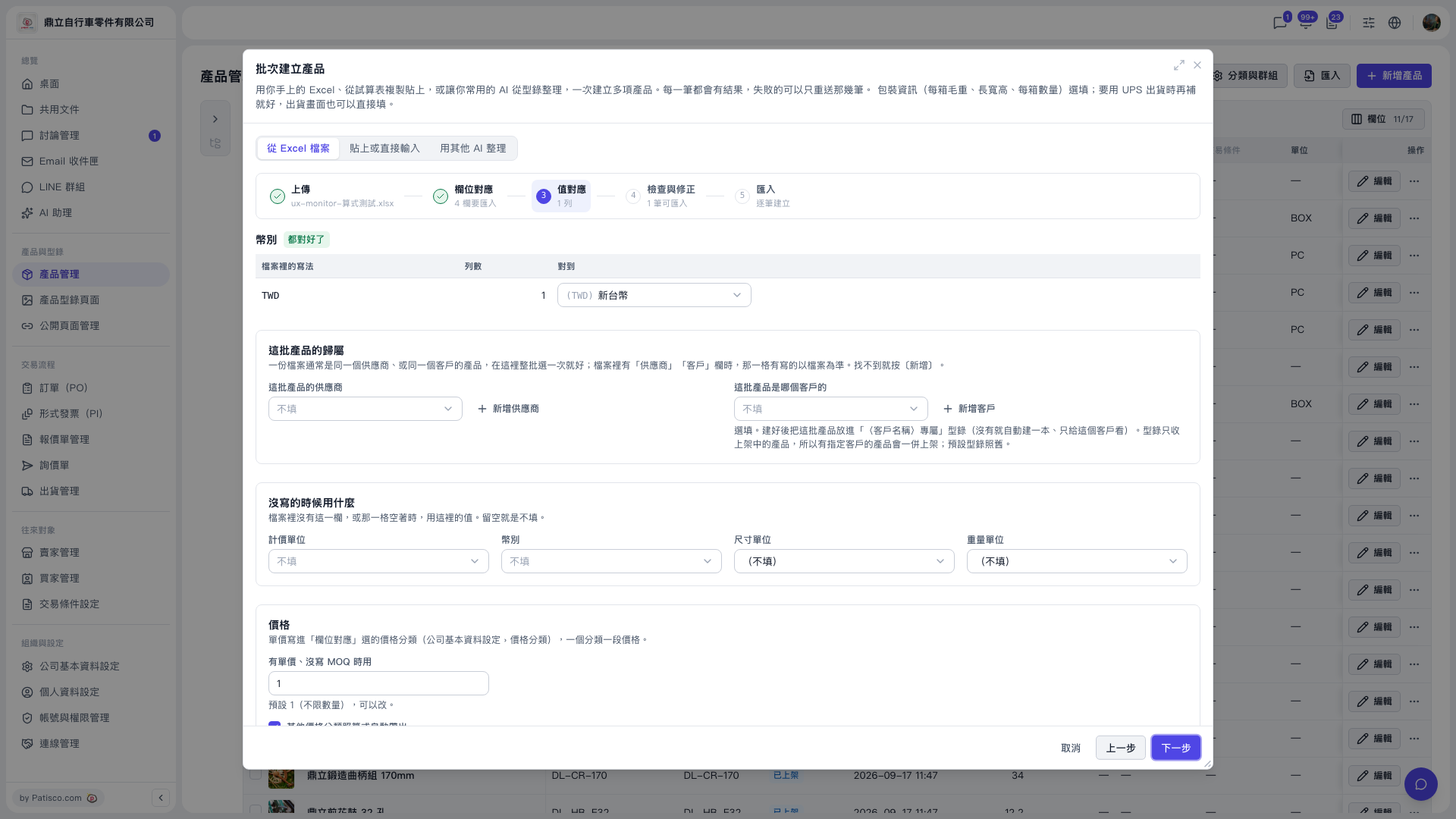
1. In the “Supplier for this batch” or “Buyer these products belong to” dropdown, select the party. If you cannot find it, click “Add Supplier” or “Add Buyer” on the right of the dropdown. Both of these fields can be left blank. 2. In the “When not specified, use” section, set the defaults for pricing unit, currency, dimension unit, and weight unit as needed. These values are used when the file does not specify them; if left blank, the field is left empty. 3. In the “Price” section, check the default for “When there is a unit price but no MOQ specified, use”. It is currently 1, meaning no quantity limit. Change it if needed. 4. Scroll down and check the settings for the other price categories. 5. When everything is confirmed, click “Next”.
Additional note: Taking the demo account (鼎立自行車零件有限公司) as an example, “Value Mapping” has “Auto-fill other price categories by formula”, which is checked by default. With it, the base “Test Price” automatically generates “Second Test Price” (base -15%, round half up to integer, MOQ same as base).
 V5 新桌面版|批次建立產品(產品管理頁面上的對話框)