
1. First, check the "Currency" section and confirm that it shows "All matched" and that TWD in your file is mapped to "(TWD) New Taiwan Dollar". If not, choose the correct currency from the "Map to" drop-down. 2. In the "Supplier for this batch of products" drop-down, select a supplier. If you can't find it, click "Add supplier" next to it. If your file already has a supplier column, the file's content takes precedence, so you can leave this blank. 3. If this batch of products belongs to a particular customer, select the customer under "Which customer are these products for", or click "Add customer". The products will be placed in that customer's dedicated catalog. If you don't need this, leave it as "Not set". 4. In the "When not specified, use" section, set default values for the "Pricing unit", "Currency", "Dimension unit", and "Weight unit" for fields left blank in the file. You can also leave them empty. 5. Scroll down to the "Price" section and check the default for "When a unit price is given but MOQ is not" (the default is 1, meaning no quantity limit). Change it if needed. 6. After checking, click "Next" at the bottom right to go to Step 4, "Review and fix".
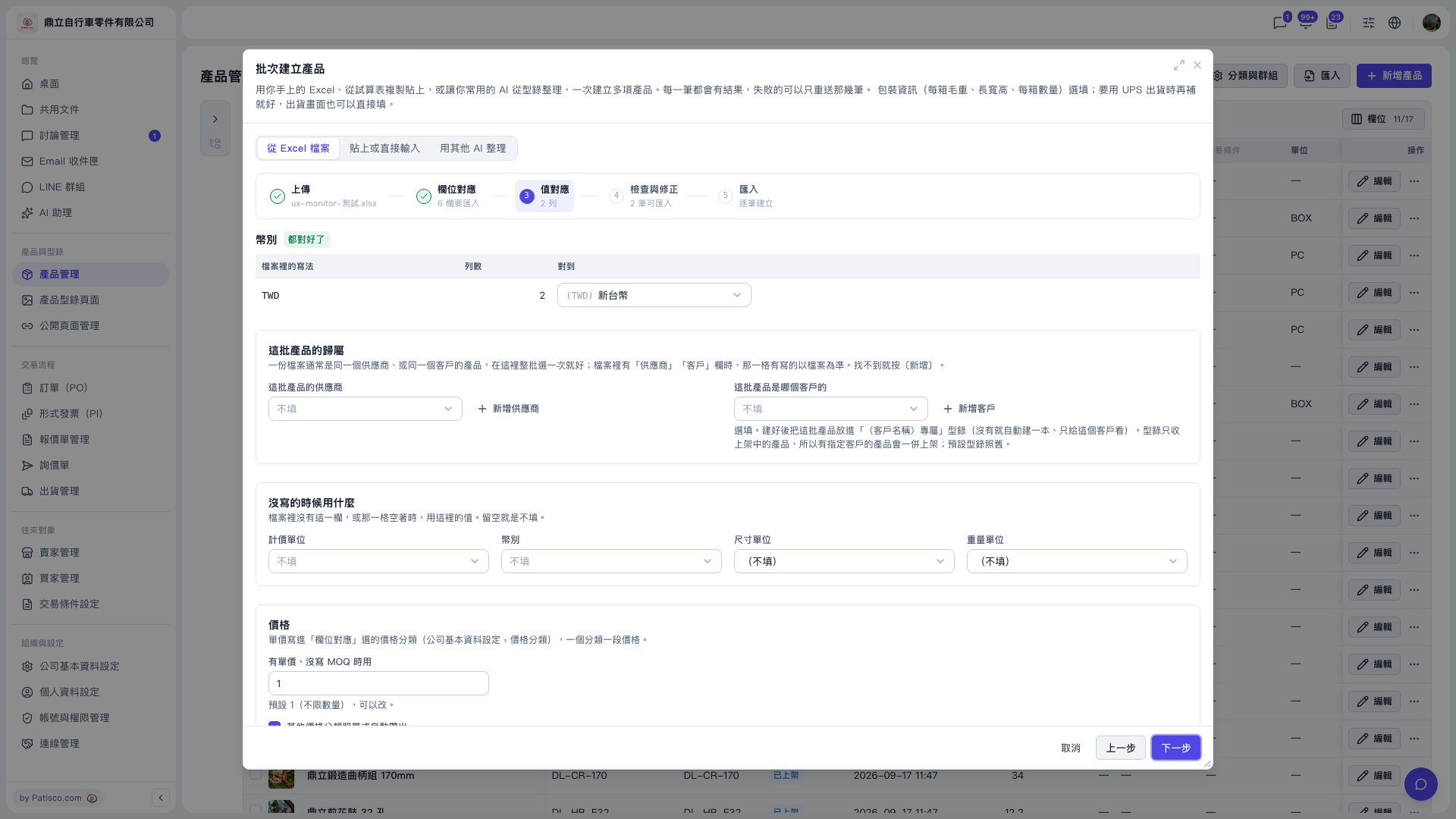 V5 新桌面版|批次建立產品(產品管理頁上的彈出視窗,步驟 3:值對應)