
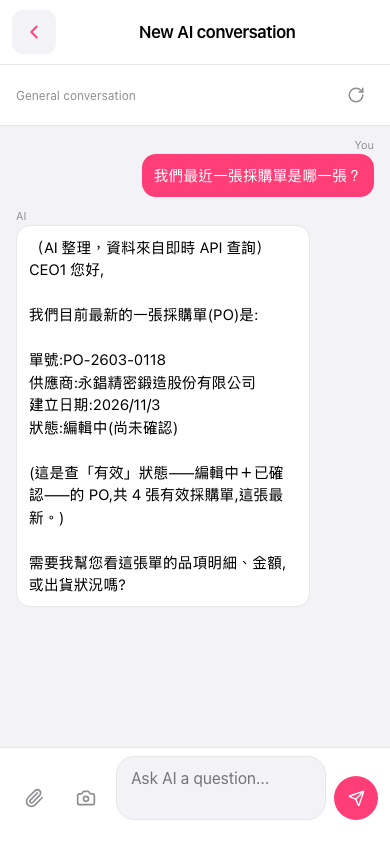
1. On mobile, go to the AI conversation page (the page title is "New AI conversation"). 2. Type your question in the "Ask AI a question..." input box at the bottom center. 3. If you need to attach a file or image, tap the paperclip icon (upload file) or the camera icon (take a photo / upload an image) at the bottom left. 4. Tap the pink paper-plane (send) button at the bottom right. 5. Wait for the AI's reply. It lists the PO number, supplier, creation date, and status.
You can ask: "我們最近一張採購單是哪一張?" (Which PO is our most recent one?) The AI replies like this: "我們目前最新的一張採購單(PO)是:單號 PO-2603-0118、供應商 永錩精密鍛造股份有限公司、建立日期 2026/11/3、狀態 編輯中(尚未確認)。" (Our latest PO is: number PO-2603-0118, supplier 永錩精密鍛造股份有限公司, created 2026/11/3, status Editing (not yet confirmed).) It also explains that this is the latest of the 4 POs in an "active" status (Editing + Confirmed), and finally asks whether you want to see the item details, amounts, or shipping status.
 手機版|New AI conversation